Introducing AI Insights Pro: Your Smarter, More Personalized Marketing Analysis
At DashThis, our mission has always been to make marketing reporting simple and insightful. You’ve told us that while our Free AI Insights are great for quick overviews, you want to go deeper, to ask custom questions, add business context, and get insights tailored to your goals.
We heard you. Say hello to AI Insights Pro. Your new add-on designed to take your data storytelling and analysis to the next level. 🚀 Let’s dive in.
Table of contents
What’s New
This upgraded AI Insights unlocks two major features that elevate your reporting experience:
💬 Chat Mode: Talk to Your Data
Think of Chat Mode as having a data analyst right inside your dashboard. You can now ask custom questions about your data, request follow-ups, and get personalized answers in real time.
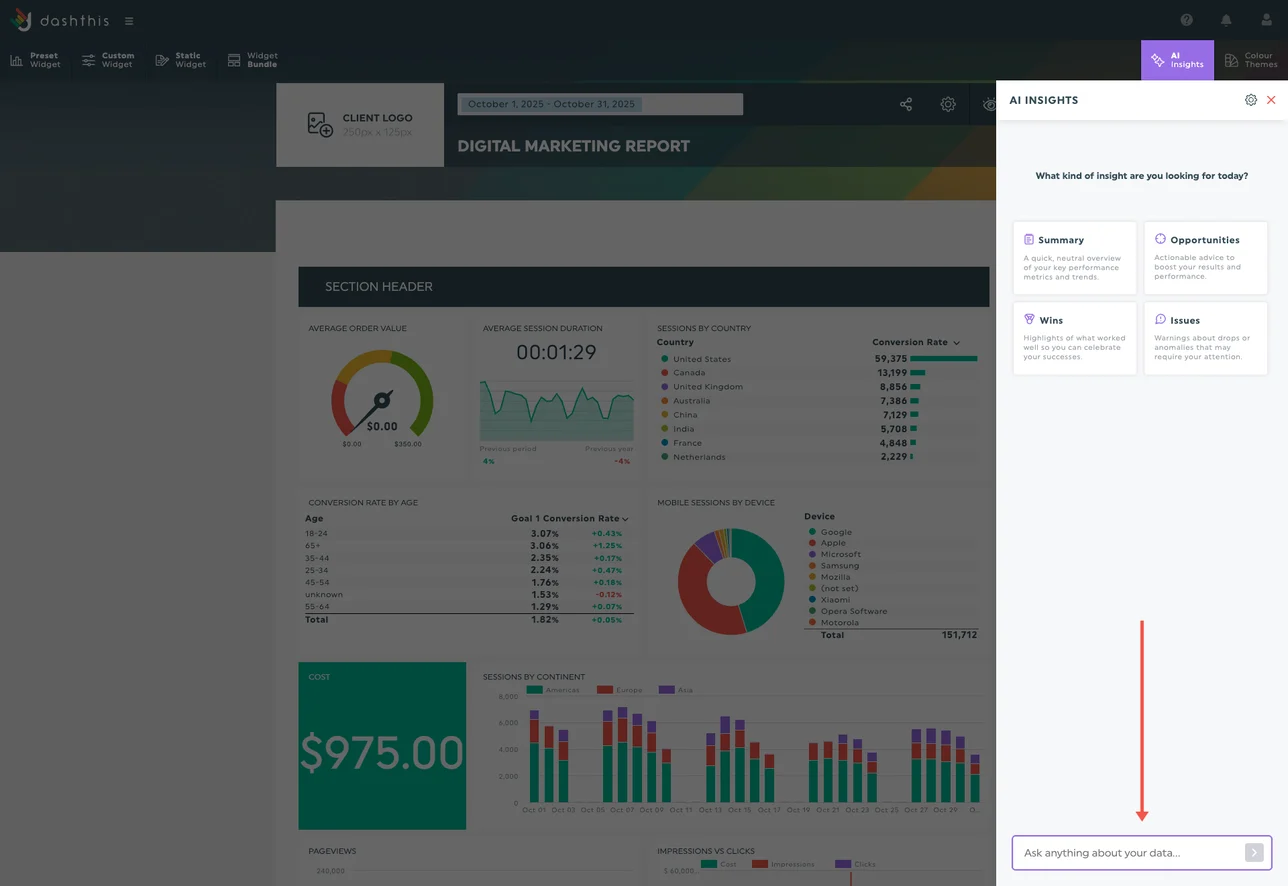
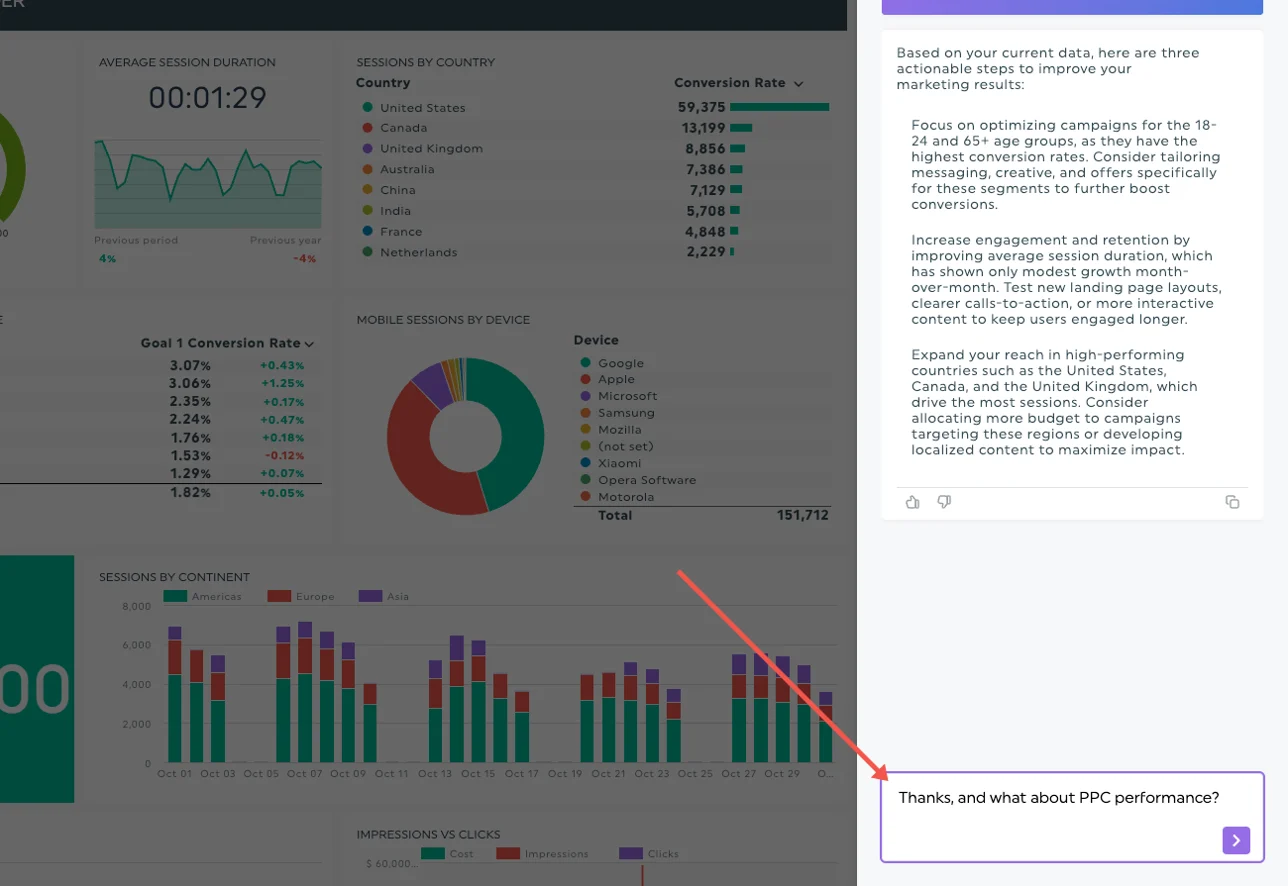
Instead of relying solely on preset insights, simply open the AI Insights panel, type your question, and hit send. The AI understands your dashboard data and provides clear, actionable analysis.
Examples of what you can ask:
- “You mentioned a drop in conversions. Which campaign performed the worst?”
- “How does this month’s performance compare to Black Friday last year?”
- “Summarize the key takeaways for my social media client.”
- “Based on this data, what 3 actions can improve my ROAS?”
How it works:
- Open your dashboard and click the AI Insights panel at the top right.
- Type your question in the chat field and press Enter.
- Keep the panel open to maintain your conversation: the AI remembers context within each session.
💡 Tip: You can ask follow-up questions anytime without starting over.
⚙️ Dashboard Context: Add Your Business Intelligence
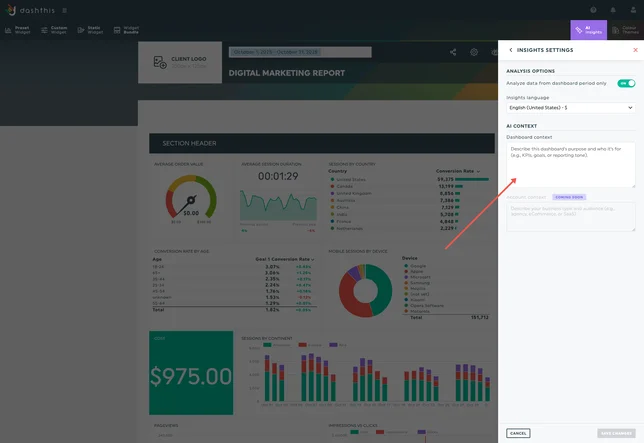
Every business is unique, and your reports should reflect that. With Dashboard Context, you can now save instructions that guide the AI’s behavior in every conversation. This feature allows you to define your goals, preferred tone, focus metrics, and audience expectations so the AI always analyzes data with your context in mind.
Use cases for Dashboard Context:
- “This dashboard is for a local New York business so ignore national data.”
- “My audience is a non-technical CEO. Keep insights simple and jargon-free.”
- “Always write in a friendly, conversational tone.”
Once you’ve set your dashboard context, DashThis AI will automatically consider it when generating insights.
How it works:
- Open the AI Insights panel and click the settings icon.
- Scroll to the AI context section.
- Add your dashboard instructions in the “Dashboard context” field.
- Click Save changes and you’re done!
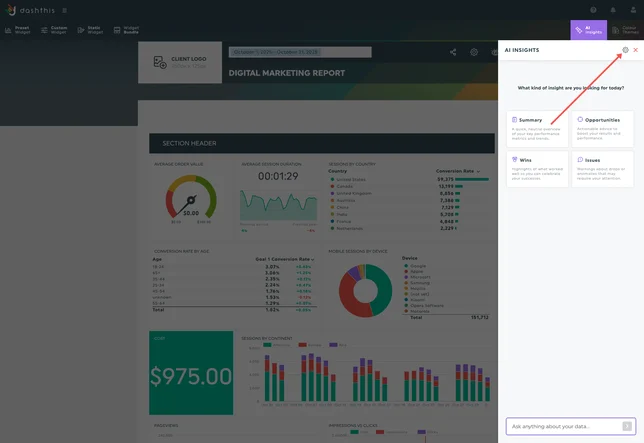
You can edit your context anytime to refine how the AI interprets your data.
Pricing & Availability
AI Insights Pro is available as an add-on for $19/month (or $15/month when billed annually) per account.
We’re currently rolling out self-serve billing for this feature, so you may not see the option in your account just yet.
👉 If AI Insights Pro isn’t available in your billing section, simply reach out to your account manager or contact our support team, and we’ll enable it for you.
This is just the beginning
This is just the beginning. We’re already working on:
- Account-Level Context: Define your overall reporting tone, key KPIs, and style once, for all dashboards across your account.
FAQ
We’ve been working hard to bring this feature to life, and we’re excited to finally share a closer look at what’s been happening behind the scenes.
What was the biggest challenge in building a feature that needs to understand data from so many different marketing platforms?
Honestly? The hard part was already done before we started. Every platform API has its own way of naming things: Google Ads says "clicks," Meta says "link_click actions," GA4 counts "events." It's chaos. But DashThis already has a normalization layer that transforms all that into a common format. By the time data reaches a widget, clicks are just clicks, no matter where they came from. So when we built AI Insights, we didn't have to teach the AI about 34 different platform APIs. We just fed it clean, standardized data. The AI sees metrics, their types, and which platforms they came from.
The lesson: good data architecture makes AI features way easier to build.
What happens behind the scenes when a user asks a question in Chat Mode?
When you type a question, the system gathers the relevant data from your selected widgets: metrics, time periods, comparisons, and so on. It then combines that with your Dashboard Context and your conversation history. The AI uses all of this to generate clear, tailored insights that actually make sense for your needs.
How does the AI decide what’s important enough to highlight as an insight?
It's a team effort between us and the AI. First, we do some pre-filtering. We send the AI the top-performing data points, stuff that's already ranking high on key metrics. So the AI isn't drowning in noise. Then we tell it the type of insights we want: wins, issues, opportunities, or a general summary and that shapes what it looks for. The AI does the pattern recognition from there. It spots trends, comparisons, anomalies and packages them into digestible insights.
What safeguards or checks ensure the insights are accurate and grounded in actual dashboard data?
The AI can only talk about data that’s truly present in your dashboard, it doesn’t take any guesses. If you ask for a time period you haven’t loaded, it will tell you just that instead of making assumptions. Every insight also links back to the specific widgets it used, so you can validate where the conclusions came from. And if you ask something outside the scope of your dashboard, it will politely stay in his reporting lane.
How do you make sure the AI doesn’t get confused by unusual data or custom metrics marketers import?
We tell the AI exactly what type of data it’s looking at (currency, percentage, time duration, etc.), so it knows that $1,000 is great for revenue but terrible for cost-per-click. Custom metrics you’ve built are included too so the AI understands your blended or calculated KPIs without getting lost.
Dashboard Context lets users “teach” the AI about their business. Why is this step so important?
This is really where the magic happens. By adding details about your goals, your client’s preferences, or what your boss cares about most, you give the AI a clear framework to understand what truly matters in your reports. Whether you want to focus on revenue metrics, highlight specific KPIs, or work toward personal goals — like renewing a client next year — you can include all of that so the AI tailors its insights accordingly. And because the Dashboard Context is meant to be living and adaptable, you can update it anytime. This ensures the AI always stays aligned with your needs and consistently delivers insights that make sense for you and your clients.
Thank you to Francis, François & JP for their input 🙂
Start exploring, ask deeper questions, and let your data tell the full story. 💡 Try it in Dashthis today!

Ready to us AI superpowers in Dashthis?
Read More
Don’t miss out!
Follow us on social media to stay tuned!


Automate your reports!
Bring all your marketing data into one automated report.
Try dashthis for free