We’re Updating Our Pricing to Better Reflect How You Use DashThis

At DashThis, our goal has always been simple: help you build reliable marketing reports without friction or wasted time.
As our product has grown, so has the way our customers use it. To keep things fair, predictable, and aligned with how the platform is actually used, we’re making an update to our pricing structure starting March 30th, 2026.
This update introduces source-based pricing, meaning plans now reflect both the data sources you connect and the dashboards included.
Here’s what’s changing, why we’re doing it, and what’s in it for you.
Table of contents
- What’s changing
- What’s New, and What’s Coming Next 🚀
- What Is a Source, Exactly?
- How is a source Calculated
- How to Check and Manage Your Sources
What’s changing
Until now, DashThis plans were based on the number of dashboards. That worked well, but it didn’t always reflect how the platform is actually used. With this update, pricing becomes more aligned with real usage.
* To learn more about how it affects your account specifically, please refer to the email sent.
Here's a quick overview:
- Each plan now includes a defined number of sources
- Plans now reflect both the dashboards included and the number of data sources connected
- Costs are fairer across customers
When setting these new source limits, our goal was to remain an affordable and accessible reporting solution, while ensuring pricing better reflects actual usage.
For over 90% of our customers, the included source limits are more than enough and won’t require any changes to their account or workflows.
For those who are above their plan’s limit, we’ve reached out directly with clear options and support to make the transition smooth.
What’s New, and What’s Coming Next 🚀
This update isn’t just about pricing, it’s also about continuing to invest in a marketing reporting platform you can trust.
Over the past months, we’ve rolled out improvements across the platform, including:
- New AI Insights features that help marketers spot trends faster and make more confident decisions
- The addition of new metrics, dimensions, and integrations like Reddit and Pinterest Ads.
Coming up, you can expect:
- Highly requested new integrations, like Shopify
- KPI calculation features to help you better measure your data
- Additional AI features to help you automate way more, be more efficient and facilitate reporting communication with your client.
- New tools to help you communicate results more clearly and confidently to clients
This updated pricing structure allows us to continue investing in the features you rely on, and the ones you’ve been asking for.
What Is a Source, Exactly?
A source is a unique connection that pulls data into DashThis.
Examples of sources:
- one Google Analytics property
- one Google Ads account
- one Facebook Ads account
Each distinct entity you connect counts as one source, even if they come from the same platform or login, if it’s used across multiple dashboards.
Example: Google Analytics 4 (GA4)
Let’s say you connect one GA4 account to DashThis. If that GA4 account has access to multiple GA4 properties or clients, like in the example below:
- Client A
- Client B
- Client C
Each GA4 property you add is considered a separate source.
How is a source calculated
In DashThis, a source is counted as used as soon as it is added to a dashboard. Even if no widget is currently using it, the source still counts as used as long as it remains in that dashboard.
A source is counted as used when:
- It is added to at least one dashboard
A source is not counted as used when:
- It is connected to your account but not added to any dashboard
- It was previously added to a dashboard, but it has since been removed from all dashboards
Example
- You connect a Google Analytics 4 property → not counted yet
- You add that GA4 property to a dashboard → 1 source used
- You don’t add any widget yet → still 1 source used (because it’s in the dashboard)
- You use the same source in multiple widgets or dashboards → still 1 source used
- You remove the source from all dashboards → not counted anymore
How to Check and Manage Your Sources
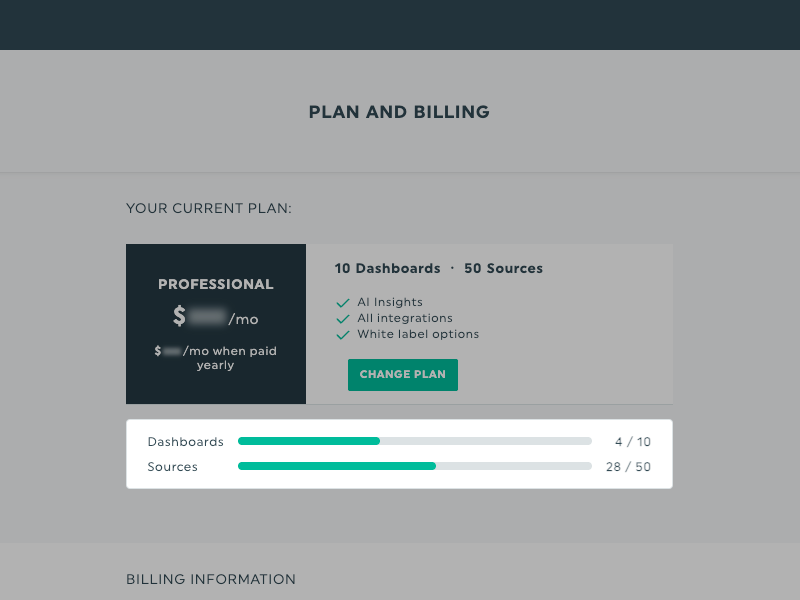
You can see how many sources you are currently using in two places in your DashThis account. Both locations show your used sources compared to the number of sources included in your plan.
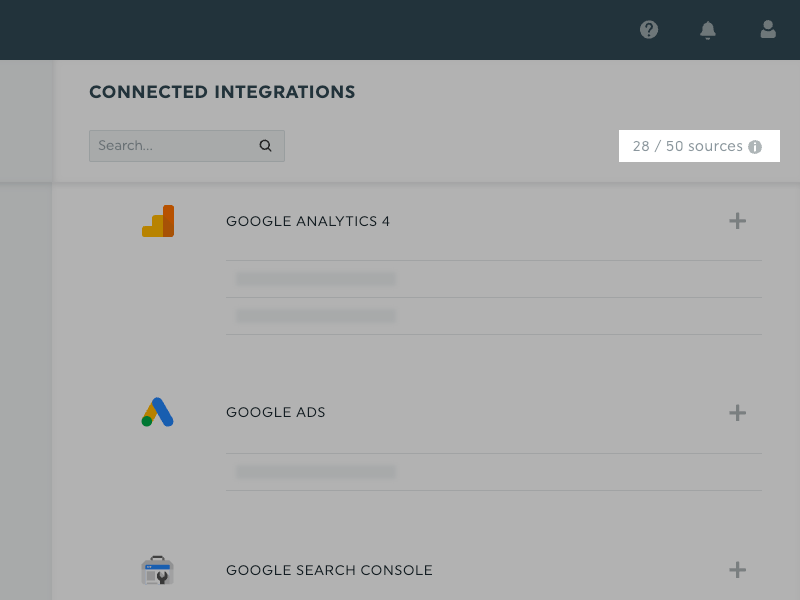
In the integration section
Go to Integrations in your account.
At the top right of the page, you’ll see a counter showing:
- Used sources / Total sources available
In the Plan & Billing section
Go to Plan & Billing in your account.
Under your current plan details, you’ll see:
- The number of dashboards used
- The number of sources used
Doing a quick cleanup can often bring your usage comfortably within your plan’s limits.
We’re confident this new structure creates a better experience for the long run, a fair model for our customer base, and we’re here to help every step of the way.
If you have questions, our team is just a message away 💙
Happy reporting!

Read More

Don’t miss out!
Follow us on social media to stay tuned!


Automate your reports!
Bring all your marketing data into one automated report.
Try dashthis for free