Ecommerce analytics tools are software platforms that collect, measure, and visualize the data your online store generates, from traffic and product views to checkouts and repeat purchases. The right tool turns scattered numbers into clear answers about what is working in your store and what is quietly losing you sales.
This guide compares the eight best ecommerce analytics tools for 2026 across four categories: store and web analytics, behavior analytics, product and funnel analytics, and profit and attribution analytics. For each one you will see what it does, who it is best for, its standout features, and how it is priced, so you can pick the stack that fits your store.
What is an ecommerce analytics tool?
An ecommerce analytics tool is software that tracks how visitors find, browse, and buy from an online store, then reports on metrics like sessions, conversion rate, average order value, and customer lifetime value. In short, it answers three questions: where do shoppers come from, what do they do on the site, and how much revenue does that activity produce.
Most stores use more than one tool because each is built for a different layer of the funnel. A web analytics platform measures traffic and conversions, a behavior tool shows how people interact with individual pages, and an attribution tool ties spend to sales. Learn which numbers matter most in our guide to key ecommerce metrics to track.
Ecommerce analytics tools compared at a glance
Pricing models are accurate as of June 2026. Confirm current plans on each vendor's site before publishing.
1. Google Analytics 4
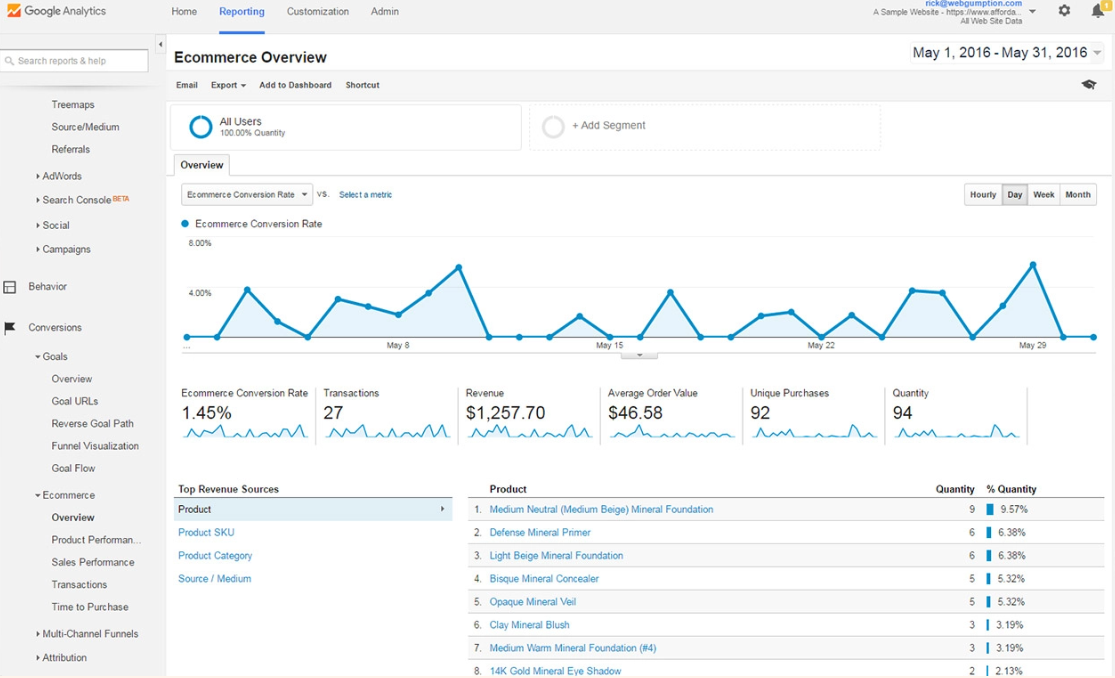
Google Analytics 4 (GA4) is the free, event-based analytics platform from Google and the default starting point for most online stores. It tracks the full path from first visit to purchase, including product views, add-to-carts, and checkouts.
Best for: Any store that needs a reliable, free foundation for traffic and conversion data.
Standout features:
- Built-in ecommerce events for product views, cart actions, and purchases.
- Cross-device and cross-channel reporting in one property.
- Free integration with Google Ads and Search Console.
- Custom funnels and audience segments without extra cost.
Pricing: Free. A paid tier, GA4 360, exists for very large enterprises.
New to GA4 for stores? See how to set it up in our walkthrough on building an ecommerce dashboard in Google Analytics.
2. Shopify Analytics
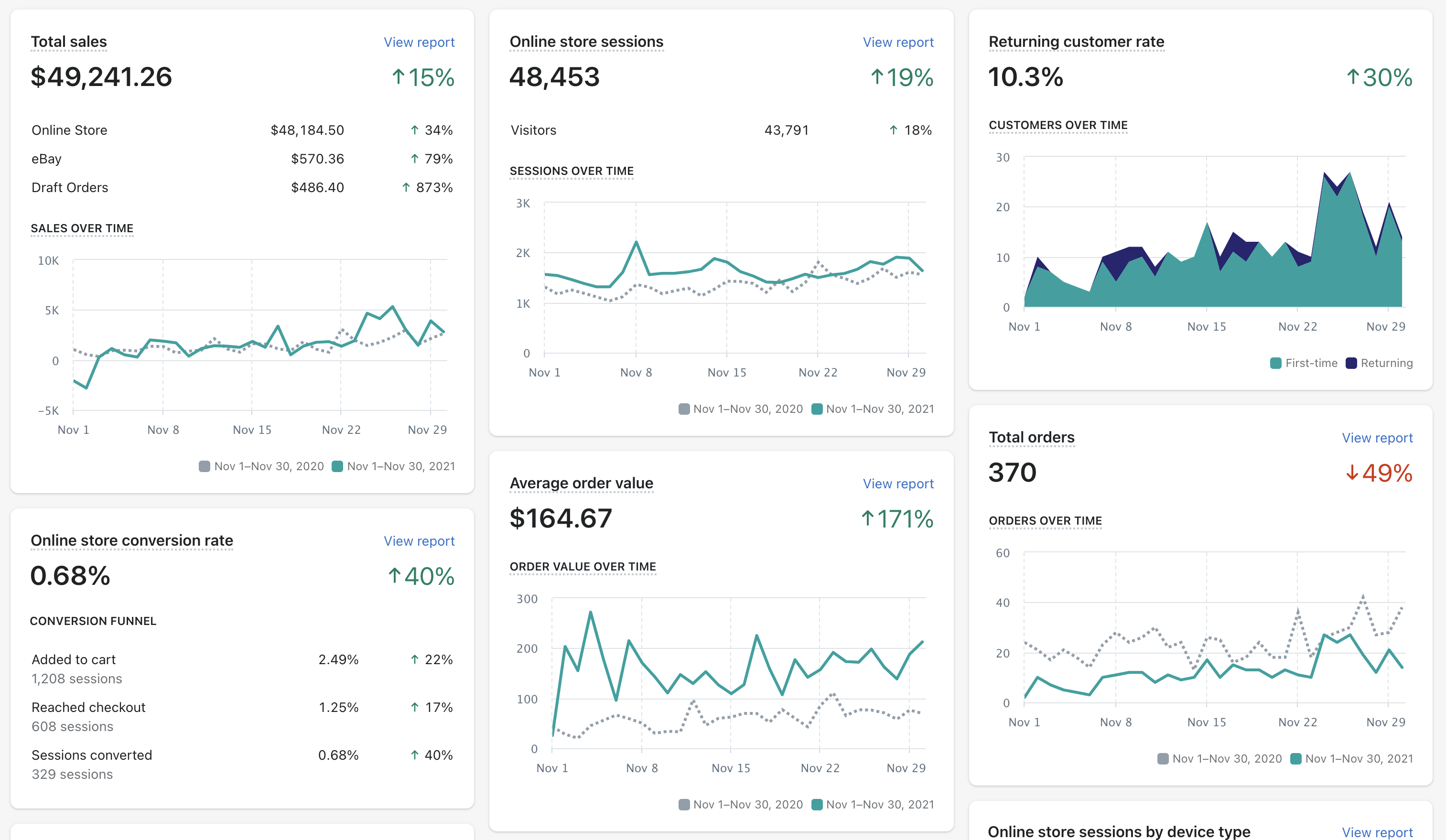
Shopify Analytics is the reporting suite built into every Shopify plan. Because it sits inside the platform that processes your orders, it reports on sales, sessions, and conversion rate with no extra setup.
Best for: Shopify merchants who want accurate sales data without installing anything.
Standout features:
- Live view of sessions, orders, and revenue as they happen.
- Finance, sales, and customer reports tied directly to order data.
- Product-level performance, including best sellers and slow movers.
- Customer cohort and retention reports on higher plans.
Pricing: Included with every Shopify subscription; report depth increases on higher plans. Most carts, including WooCommerce and BigCommerce, offer a similar native suite.
3. Adobe Analytics
Adobe Analytics is an enterprise-grade analytics platform built for high-volume stores that need deep segmentation and custom data models. It is far more powerful than free tools, and far more involved to run.
Best for: Large retailers and enterprises with dedicated analytics teams.
Standout features:
- Advanced segmentation across millions of sessions.
- Predictive metrics and anomaly detection powered by Adobe Sensei.
- Deep integration with the wider Adobe Experience Cloud.
- Flexible, custom attribution modeling.
Pricing: Custom enterprise quotes only. Expect a significant annual commitment.
4. Microsoft Clarity
Microsoft Clarity is a completely free behavior analytics tool offering heatmaps and session recordings with no traffic limits. For stores that want Hotjar-style insight without a budget, it is the obvious pick.
Best for: Budget-conscious stores that want unlimited heatmaps and recordings for free.
Standout features:
- Unlimited session recordings and heatmaps at no cost.
- Automatic flags for rage clicks, dead clicks, and excessive scrolling.
- Simple, fast setup with a single tracking snippet.
- Native connection to Google Analytics data.
Pricing: Free, with no usage caps.
5. Hotjar
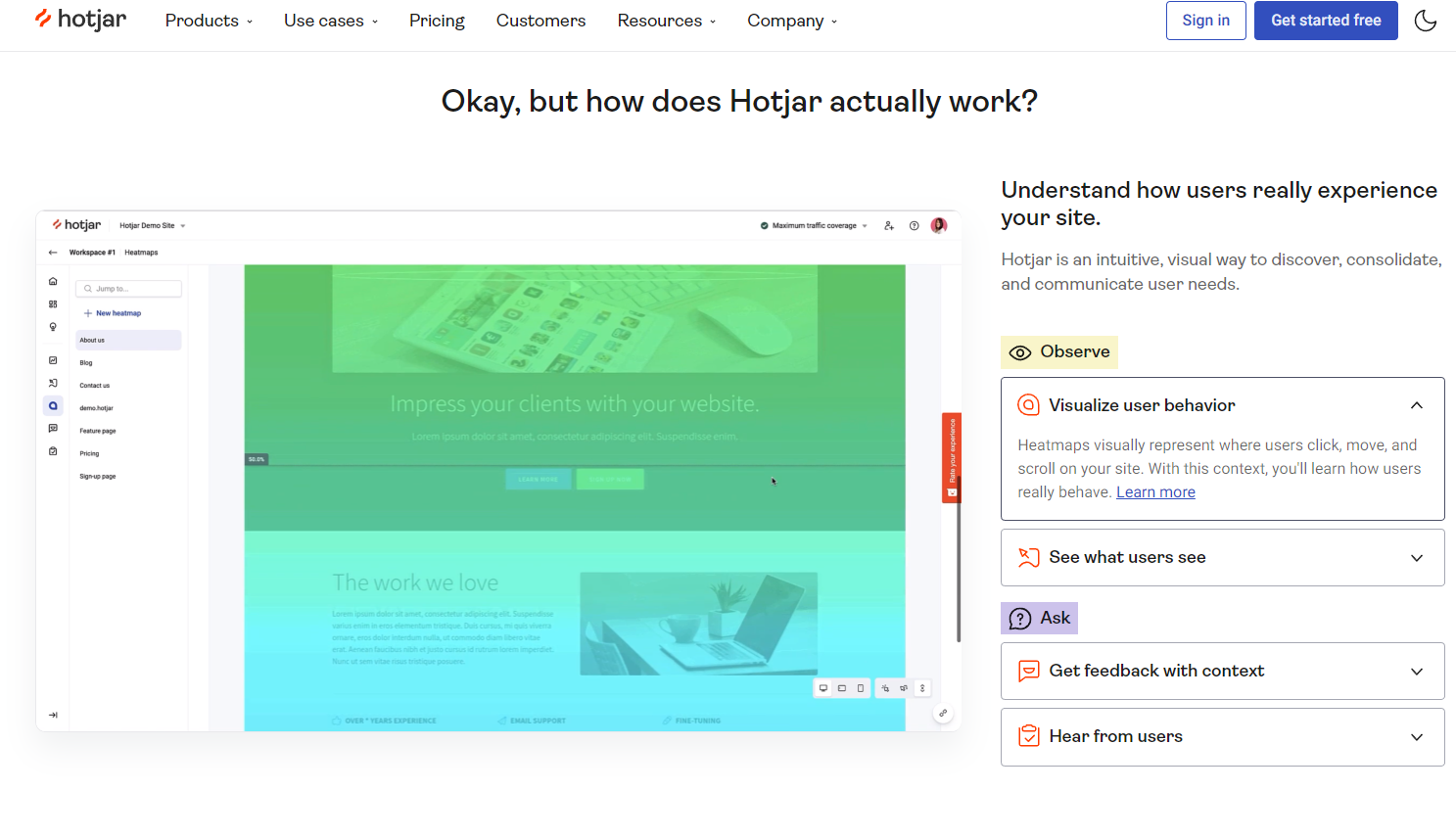
Hotjar is a behavior analytics tool that shows why shoppers act the way they do, using heatmaps, session recordings, and on-site surveys. It complements traffic tools by explaining the human story behind the numbers.
Best for: Stores diagnosing why visitors abandon product or checkout pages.
Standout features:
- Heatmaps showing where shoppers click, scroll, and stall.
- Session recordings of real visits, including rage clicks.
- On-page surveys and feedback widgets.
- Conversion funnels that highlight the biggest drop-off step.
Pricing: Free plan for limited recordings; paid plans add volume and advanced filters.
6. Mixpanel
Mixpanel is a product analytics tool focused on funnels, retention, and the specific events that lead to a purchase. It is built to answer questions like which steps lose the most shoppers and which actions predict repeat buyers.
Best for: Stores and apps that want granular funnel and retention analysis.
Standout features:
- Multi-step funnel reports with drop-off at each stage.
- Retention and cohort analysis over time.
- Custom event tracking for any on-site action.
- Real-time dashboards for product and growth teams.
Pricing: Free plan covers a generous monthly event volume; paid plans scale with events and seats.
7. Heap
Heap is a product analytics platform that automatically captures every click, tap, and form submission, so you can analyze interactions you forgot to tag. That autocapture approach removes much of the manual setup other tools require.
Best for: Teams that want full behavioral data without defining every event upfront.
Standout features:
- Automatic capture of all user interactions, retroactively analyzable.
- Visual funnel and path analysis.
- Friction and drop-off detection across journeys.
- Segmentation by behavior, source, and device.
Pricing: Free plan for smaller stores; paid plans are quoted by volume.
8. Triple Whale
Triple Whale is a profit and attribution analytics tool built for direct-to-consumer brands, especially on Shopify. It connects ad spend across channels to actual orders so you can see true return on ad spend and net profit, not just platform-reported numbers.
Best for: DTC brands that run paid ads and need reliable attribution and profit data.
Standout features:
- Cross-channel attribution that reconciles ad platform claims.
- Real-time profit and contribution-margin tracking.
- Customer lifetime value and cohort reporting.
- A unified dashboard for paid media and store performance.
Pricing: Paid plans based on store revenue and ad volume; no permanent free tier.
Bonus: Dashthis
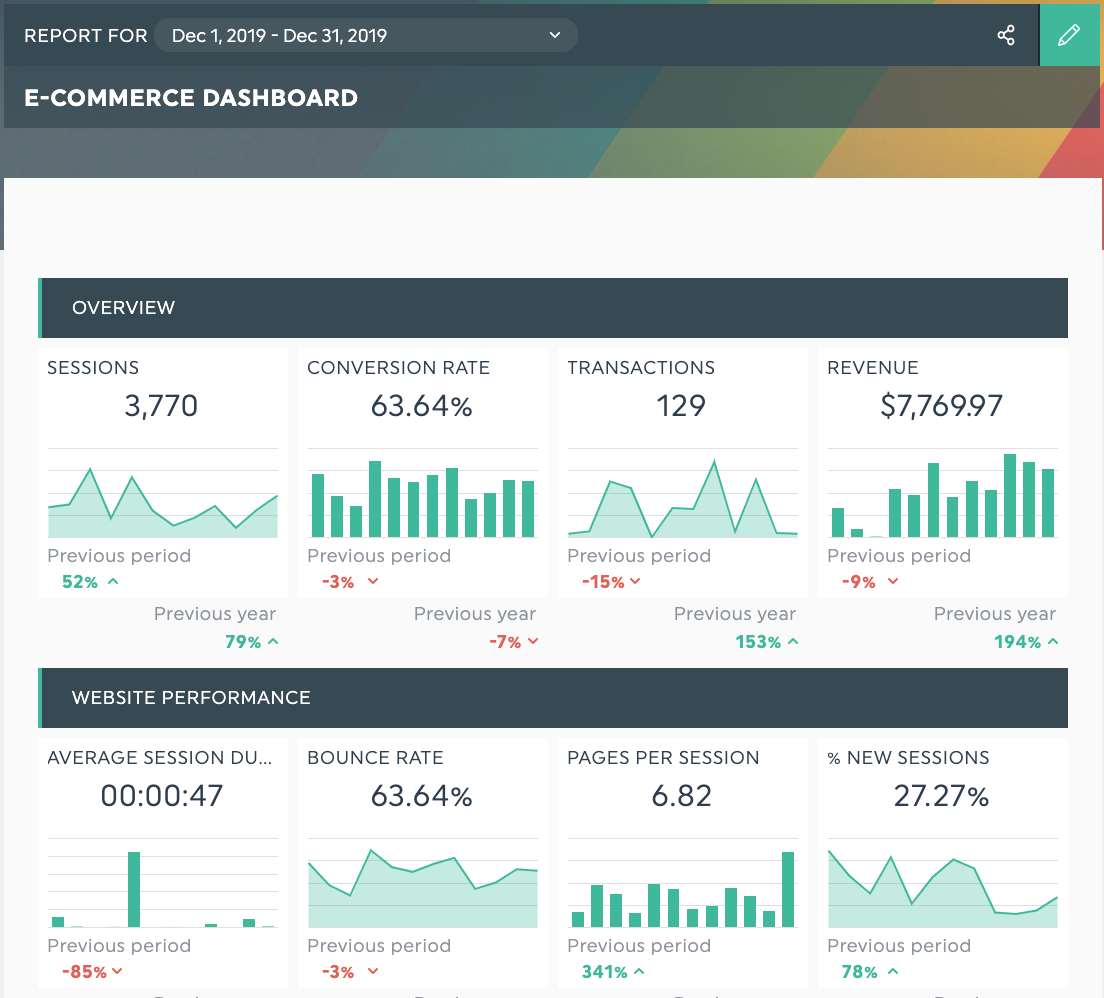
Grab this template with your data!
Your online business probably uses various marketing platforms, from analytics to social media, SEO and email campaign tools… and everything in between! With DashThis, you can connect your eCommerce dashboard to over 30 integrations, including Shopify, Google Analytics, Ahrefs, Google Ads, Facebook Ads, Moz, and Instagram. The Shopify integration pulls your sales, orders, and customer data straight from your store, so it sits right next to your marketing metrics with no manual exports.
Dashthis’s report templates are user-friendly, seamless, and can be easily shared with your team or clients. Here is what our client, Reef Digital Agency, has recently said about us:
"We've played around with countless reporting tools over the years, but none of them come close to Dashthis. The integration and customization of reports and their outstanding client support are unrivaled!”
How to choose the right ecommerce analytics tool
The best stack depends on the questions you most need answered, not on which tool has the longest feature list. Work through these criteria before you commit:
- The question you are solving. Pick web analytics for traffic and conversions, behavior tools for on-page friction, and attribution tools for ad ROI.
- Your platform. Start with the analytics already built into your cart, then layer on specialist tools.
- Your budget. GA4 and Clarity cover a lot for free before any paid tool is needed.
- Team skill. Enterprise tools reward dedicated analysts; lean teams move faster with simpler platforms.
- How the data gets shared. Consider how each tool's data will reach the people who act on it.
From analytics to reporting: bringing it all together
Most stores end up with data spread across several tools: GA4 for traffic, Shopify for sales, Clarity for behavior, and an ad platform for spend. Analytics tools are excellent at gathering that data, but each one only shows its own slice, which makes a clear overall picture hard to assemble.
That is the gap a reporting tool fills. DashThis connects your analytics sources into a single automated dashboard, including a native Shopify integration that pulls your sales and customer data directly from your store, so traffic, sales, behavior, and ad performance sit side by side and update on their own. Instead of exporting spreadsheets from five places, your team and clients read one report. See examples of what to include in our guide to the best ecommerce analysis reports, and track the metric that matters most with our ecommerce conversion rate breakdown.
Frequently asked questions