We hear this from our own customers too. Three in four DashThis customers were manually exporting, screenshotting, or copy-pasting marketing data into ChatGPT and Claude to get analysis done. One of our survey respondents wrote: "I have to send screenshots to Claude, because my Chrome MCP connector doesn't work with DashThis."
You no longer need to do this with MCPs. If you work directly within generative AI assistants to analyze data, brainstorm ideas, draft emails or otherwise, MCPs make it a lot easier to reference your live marketing data alongside your AI's project context and chat history.
But it doesn't mean you can hand your entire reporting function over to your AI. MCP solves the problem of getting your data into your AI assistant, but your AI still needs your expertise to know what those numbers actually mean for your clients. Here's what to take note of as you adopt MCP connectors like the one from DashThis in your client reporting process.
So, what is MCP, exactly?
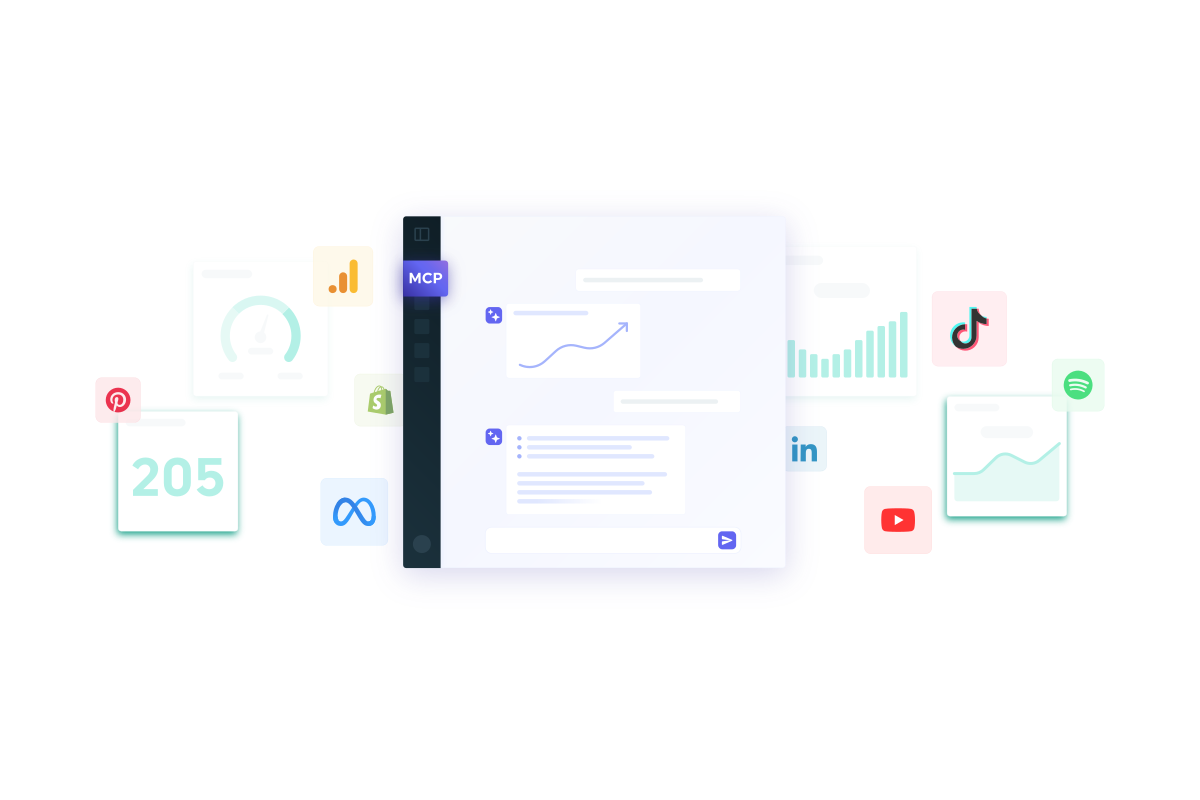
Model Context Protocol (MCP) is a shared way for LLMs (Large Language Models) and AI assistants like Claude and ChatGPT to connect directly to your live interactive reports and marketing data in reporting tools like DashThis through one secure connection.
Anthropic introduced MCP in 2024 as an open standard, so it isn't locked to a specific company's AI. As long as a tool supports an MCP server, any AI assistant can connect to it, including coding tools like Claude Code and Cursor, which use the same MCP protocol to connect to codebases and other data sources. Once your data is connected, Claude or ChatGPT can reference it directly in conversations.
MCPs broaden what your AI assistant has access to directly within chats. Besides pulling in first-party context, like what you just asked or what's in your past chats, you can query your live marketing data in DashThis directly, right in the chat window you already use, whether that's Claude.ai, Claude Desktop, or ChatGPT. No more taking screenshots of charts and pasting them into Claude.
Why MCP analytics servers seem to be everywhere in 2026
If it seems to you that every SaaS tool (including DashThis) is rolling out MCP servers in 2026, you're not imagining it. According to Scott Brinker and Frans Riemersma's State of Martech 2026 report, MCP servers went from zero mentions to over 29,000 mentions in 18 months. In comparison, the martech landscape took 15 years to reach half that number, and grew less than one percent in the last year alone.
Just in 2026 alone, we've had MCP launches from HubSpot, Meta Ads, Amazon Ads, and TikTok. SaaS tools are developing MCP servers because working with your data through an AI assistant isn't a novelty anymore. The State of Martech 2026 survey found 84% of marketing teams are already doing some version of it:
- AI built into an existing tool they already use
- A dedicated AI assistant, like Claude or ChatGPT
- A tool they built in-house
Some of these connectors answer questions about your data. They can also act autonomously, managing campaign bids, budgets, and targeting directly. Most marketing teams aren't there yet; the same report found autonomous AI trailing well behind analytical and generative use cases across every category surveyed.
But as AI gets more capable, getting your data right will matter even more. When your connectors and AI agents act on their own, any inaccuracies in your data affect everything else in your workflow, so it's worth getting right from the start.
Three things MCP doesn't solve for client reporting
MCP gets your data into your AI assistant. What it does with that data still depends on you, in three specific ways.
It doesn't know how you define a metric
Most marketing metrics and KPI examples have a specific definition and calculation. Impressions and reach have straightforward definitions. But there are some metric calculations that need you to define how they’re calculated before you report on them.
Take return on ad spend for example. An AI, and many of us in the marketing world, calculate it by taking ad revenue divided by ad spend. Simple application of a formula, right? But it's a bit more complicated than that.
- Do vendor commissions or project management fees count as spend?
- Do you include your full-time staff's labor costs, or only freelance media support?
- Does spend even mean the same thing across campaign types? A video ad carries production and localization costs a simple image ad never touches.
Your AI querying through MCP servers won't understand these nuances. It'll calculate ROAS using the formula it assumes, and hand you a number that looks correct. If you haven't accounted for these nuances, the number you'll come up with won't match what your client is used to seeing.
To avoid this, tell your AI how you and your client define ROAS within the chat. You can also attach it as project context, or walk it through one worked example first, then point to that as the reference for every calculation after.
It doesn't know which data belongs to which client
Your AI assistant pulls in real numbers through the connector, but it has no way of knowing whether those numbers are fit for your analysis needs.
If your MCP connector can reference more than one client's data through the same connection, you'll need to make sure it's only pulling from the right client each time. Broader questions, like "how are my accounts performing this month," carry the highest risk, since the answer can sound just as confident whether the data behind it is the right data or not.
To make sure you're working off the right data, you'll need to separate your data manually, either by:
- Asking the assistant to name the dashboard it pulled from before you use the numbers
- Using tools like Projects in Claude and ChatGPT to keep each client's data separate
When you use MCP-connected tools, check what the tool's own documentation says about how it handles data across different clients, and verify the answer you get back only references the account you asked about.
One agency we surveyed described exactly this approach: "We use Claude Projects, one for each client to keep things separate. We currently have reports emailed to us that are brought into Dropbox automatically, then we drop that PDF into each Claude project and run a report... for a full account summary."
It doesn't know how your platforms relate to each other
With MCP connectors, each channel is its own island and you're left with a limited view of your data.
Say you're running a multi-channel campaign across Google Ads, Google Analytics 4, Meta Ads, and TikTok Ads. A client asks which channel is actually driving conversions to help them figure out which platform to allocate next quarter's budget to.
MCP connectors read each channel's data individually. They can tell you how many conversions occurred in a particular channel, but not that a customer clicked a TikTok ad first, then converted three days later after a Meta retargeting ad brought them back.
One way around this is to connect to a reporting platform that already pulls all four sources into one dashboard, but you'll still need to analyze that data yourself and work out which channel deserves the attribution credit.
A couple of agencies we surveyed also want their AI assistant to proactively flag anomalies like unusual drops or a KPI spike before they investigate further. The DashThis MCP connector doesn't offer automated anomaly detection, but you can still ask your AI to look for anomalies in the data it pulls through the connector, for example, prompting it to flag any metric that shifted more than it did in the previous reporting period.
3 practical examples for using the DashThis MCP connector in your reporting
Build quick reporting snapshots of specific metrics
Instead of exporting a PDF or taking screenshots of your dashboard before asking your AI to analyze it, use the DashThis MCP connector to reference your data directly from your dashboard. Build a quick snapshot of your conversion metrics to glance through before asking your AI what changed, especially for KPIs your clients are most interested in.
Example prompt: "Build a quick snapshot of the conversion data in the B2B digital marketing report for Acme Corporation over the last 30 days."
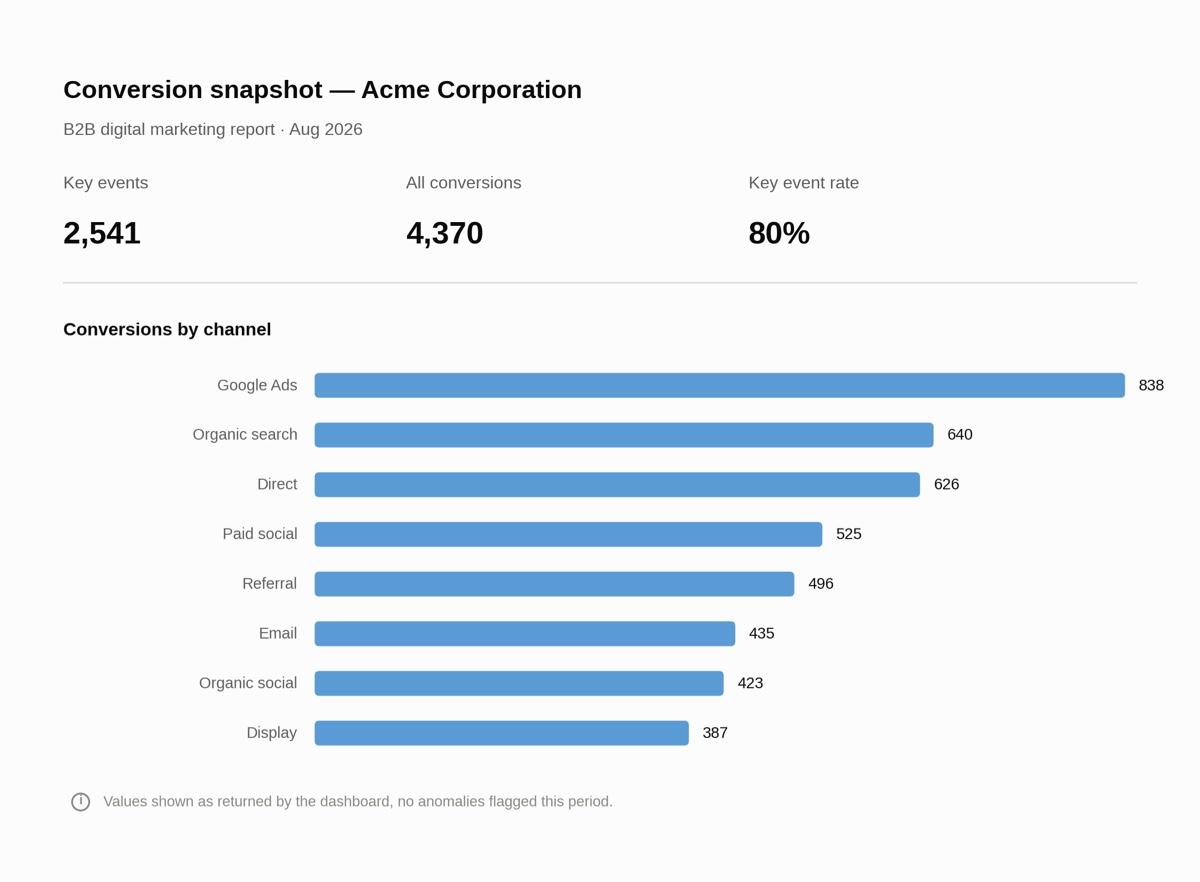
Conversion metrics snapshot, created through the DashThis MCP connector and visualized in Claude
See how this reporting period compares with your previous period
Reporting numbers only make sense when you've got something to compare them against. Did a metric go up or down from last month? How does it compare to the same period last year?
Ask your AI to run that comparison right after pulling a snapshot of specific metrics, and it calculates the numbers against your previous reporting period for you. That gives you the analytical foundation to build a full data analysis report or shape a concrete recommendation.
Example prompt: "Pull last month's conversions for the Acme dashboard, then compare that to the previous period."
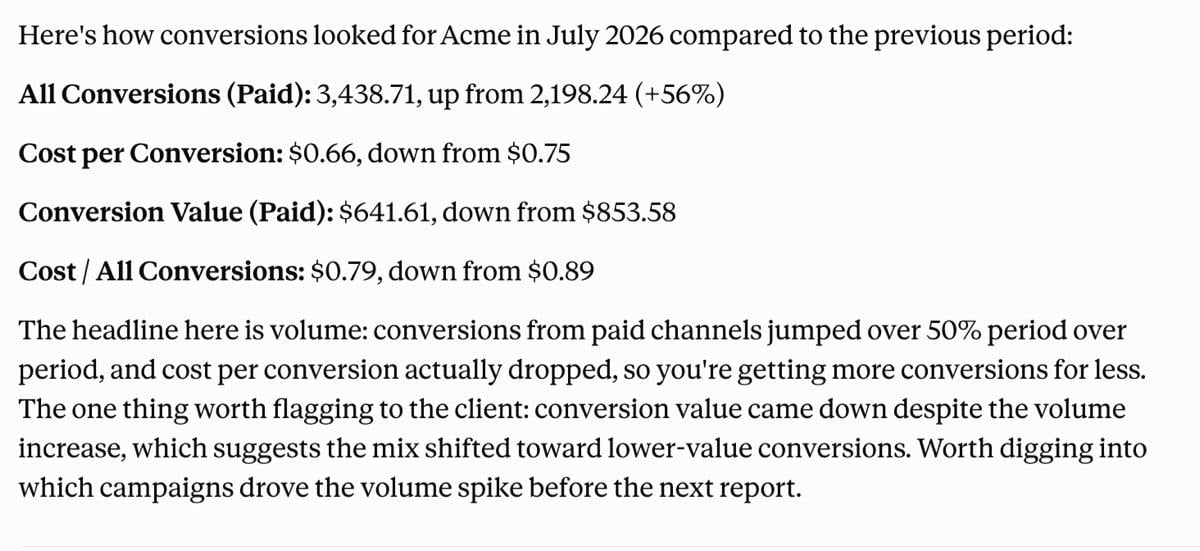
Prepare a pre-meeting summary for stakeholders
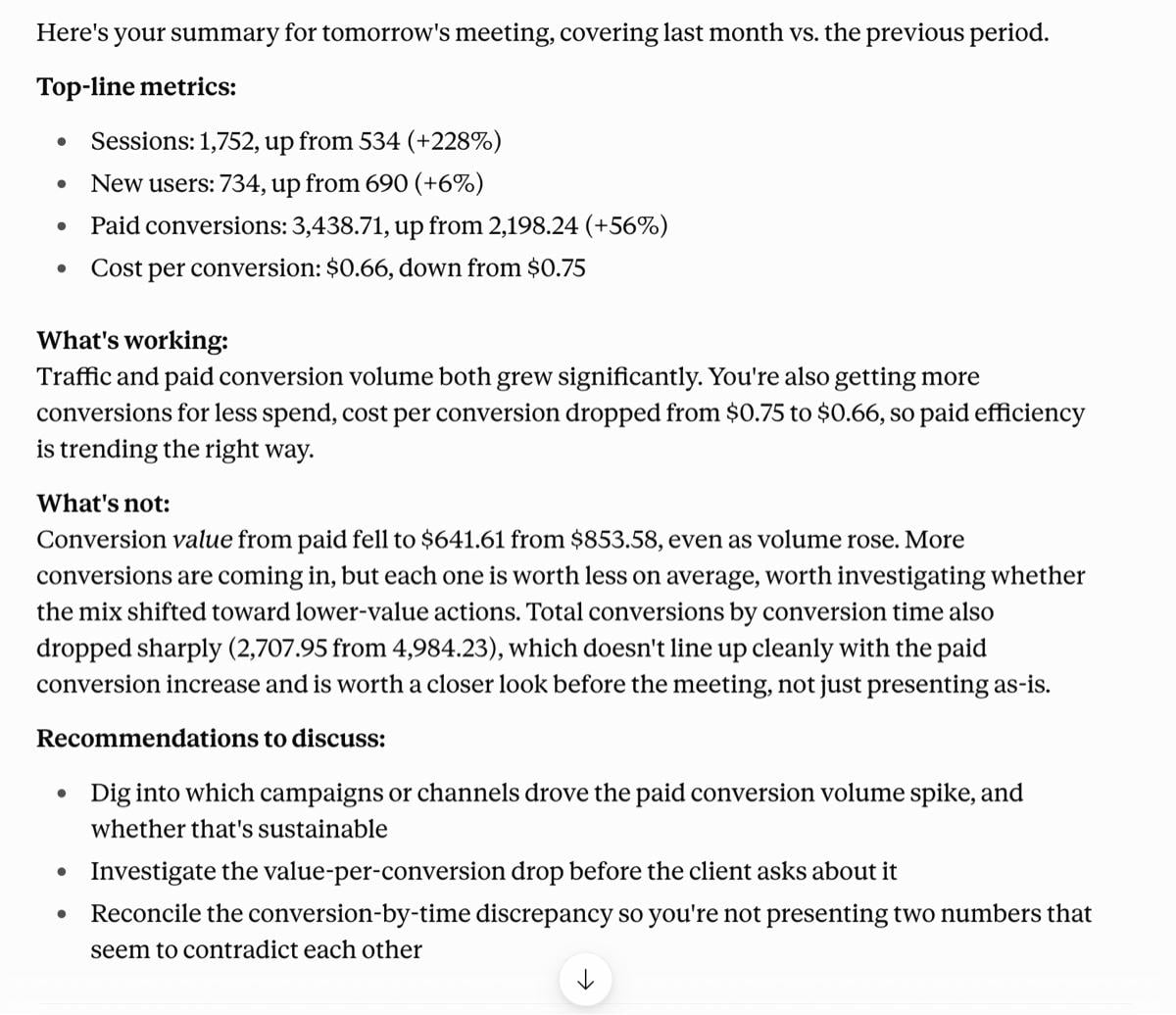
Ask your AI assistant to pull the dashboard and turn it into something you can walk in with, or send ahead to the client.
Example prompt: "I have a client meeting with Acme Corporation tomorrow. Analyze the digital marketing dashboard in DashThis and give me a short summary I can send stakeholders. Include data on top-line metrics, what's working, what's not, and a few recommendations to discuss."
Do you need to build your own MCP server, or use one that's already built?
There are three ways to connect your data to your AI tools. Here’s how they compare.
Option 1: Use individual plugins or connectors to get your data into your AI assistant
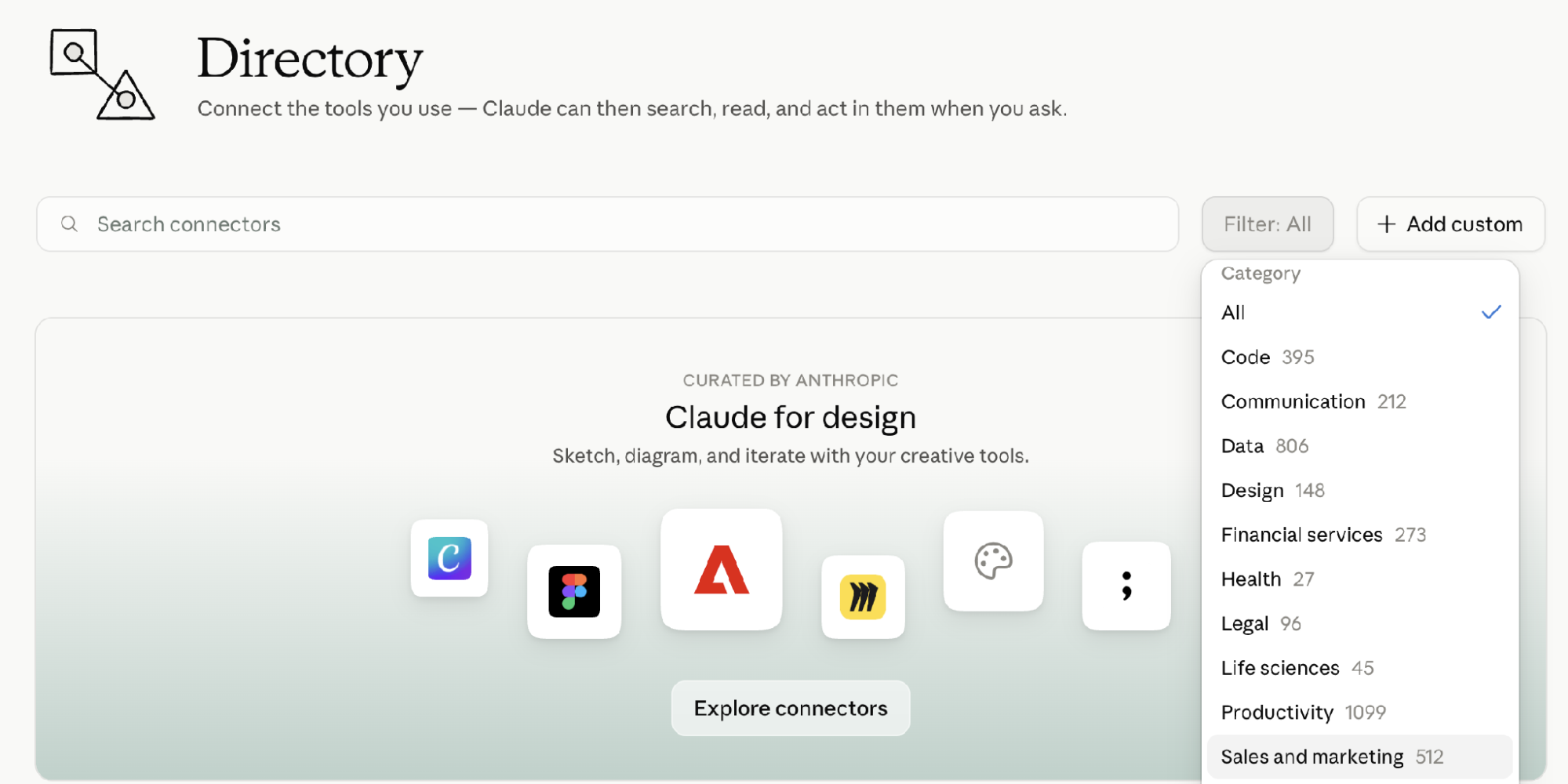
Claude and ChatGPT have a large directory of connectors (called plugins and apps in ChatGPT). As of September 2026, Claude has 500+ connectors under the sales and marketing category.
As long as a tool supports an MCP connection, you can connect your AI assistant to it. Some connections take one click, whereas others need you to copy an MCP configuration into your AI assistant first. Once you've given permissions, you can ask your AI assistant about your data directly. Depending on the capability of the MCP tool, you may even be able to update your data or reports from there (this is called write access).
Connecting more tools has a cost, though:
- Accuracy: The more tools you connect, the more the AI has to figure out which platform is the right tool to read when accessing your data. This gets more complicated when you query data across multiple sources, which can affect overall accuracy. OpenAI recommends developers connect fewer tools, even though their systems allow up to 128. Fewer tools connected means less risk of the AI reaching for the wrong one.
- AI usage cost: The more MCPs you connect, the more context window you use, which matters if you're watching your AI usage limits or budget.
This approach works best for agencies with a smaller, stable tool stack, for internal data exploration, or if you're just getting started analyzing your data in ChatGPT or Claude.
Option 2: Build your own system
This option means building a data layer before you touch MCP at all. You pull every data source into one place you control, agree on what counts as a conversion or a lead across all of them, and keep that consistent as clients and tools change. Only then do you connect your AI assistant to it.
Building this takes considerable time and technical effort. It also requires ongoing work: every new client, every new platform, and every changed metric definition means someone on your team has to update that layer to keep it accurate. That's manageable if you have a handful of clients, but expect more work as you onboard more of them.
This method gives you the most control over how your data is read and displayed, and which sources you support. If your agency has in-house developer or data support and specific requirements a pre-built platform won't cover, this is the option built for you.
Option 3: Use a reporting platform that already has an MCP connection
If your reporting platform already covers the clients and channels you work with, connecting it lets your AI assistant read and explore that data directly through chat. There's no infrastructure to build, and less risk of the tool selection problem that comes with juggling several individual connectors.
You're limited to what your reporting platform supports, though. For platforms it doesn't cover, you'll still need another way to connect that data.
For most agencies, especially if you don't have an engineering or development team on hand and just want something that works quickly, using a reporting platform like DashThis with its own MCP connection is the easiest place to start. The technical bits are handled for you, and you don't have to worry about building your own setup or juggling individual data connectors yourself. Save building your own solution for later if your needs develop.
Conclusion: Explore DashThis MCP for the tools you already use
MCP doesn't replace the thinking you'll need to do as you build reports. It removes the copy-pasting and back-and-forth you used to do to keep your tools in sync. Now you can query your DashThis reports directly from the AI tools you already use, in plain, conversational English.
Good news: the DashThis MCP connector is available to all DashThis customers and free trial users, on any plan, as long as you've got at least one dashboard set up. It reads your dashboards and writes your client recap into a dashboard that has a comment box: you iterate with Claude until you are happy, then it pushes the recap into your dashboard, and you can fine-tune it in your comment box.
Next time you're prepping a client report, try asking your AI assistant directly instead of exporting first. Connect your AI assistant to DashThis now.
Need help to get started? Our setup guides get you connected in minutes.
Connect in Claude · Connect in ChatGPT
Frequently asked questions (FAQ)