5 YouTube Analytics Tools in 2026 (When You Should Use Each)

TLDR:
- TubeBuddy is best for bulk video metadata editing to improve AI visibility; DashThis fits multi-marketing agencies managing over 10+ clients’ YouTube channels; vidIQ suits solo YouTubers ideating and validating video topics; Ahrefs’ Brand Radar is ideal for brand marketing across YouTube and the web; and Sprout Social focuses on social media management for cross-functional social teams in enterprises.
- Choose third-party YouTube analytics tools with keyword and idea discovery, advanced A/B testing, automated workflows, and cross-platform KPIs and metrics.
YouTube Studio works if you measure only video views, subscriber growth, and audience demographics.
But growing your channel, especially when dozens of videos or multiple accounts come into play here? It's possible only with an external tool.
In this guide, we compare five third-party YouTube analytics tools and break down when you should use each.
| YouTube analytics tool | Free trial | Annual pricing | Best for |
|---|---|---|---|
| TubeBuddy | Free plan | Starts at $12/month | Bulk video metadata editing for AI visibility |
| DashThis | 14 days | Starts at $44/month | Multi-marketing agencies managing 10+ YouTube channels |
| vidIQ | Free plan | Starts at $16.58/month | Video ideation and validation for solo YouTubers |
| Ahrefs | Free plan | Starts at $29/month | Brand marketing across YouTube and the web |
| Sprout Social | 3 days | Starts at $79/month for each seat | Social media management for enterprise social teams |
Bulk video metadata editing for AI visibility: TubeBuddy
Pricing: Starts free with paid plans from $12/month on an annual subscription.
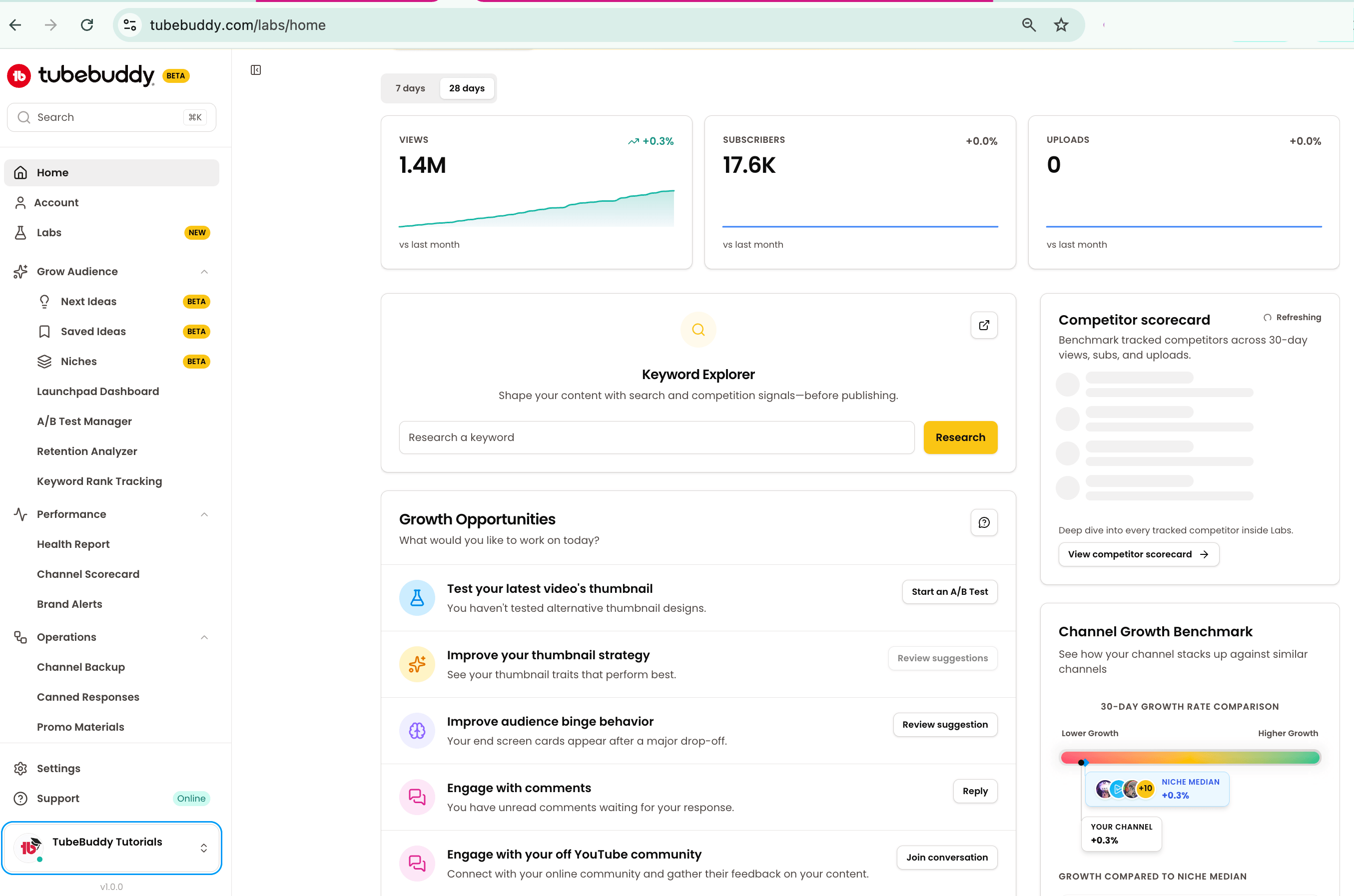
TubeBuddy combines video performance analytics, keyword discovery, ranking and click-through rate (CTR) optimization, and bulk editing in one browser extension.
Notably, the bulk editors deserve a closer look.
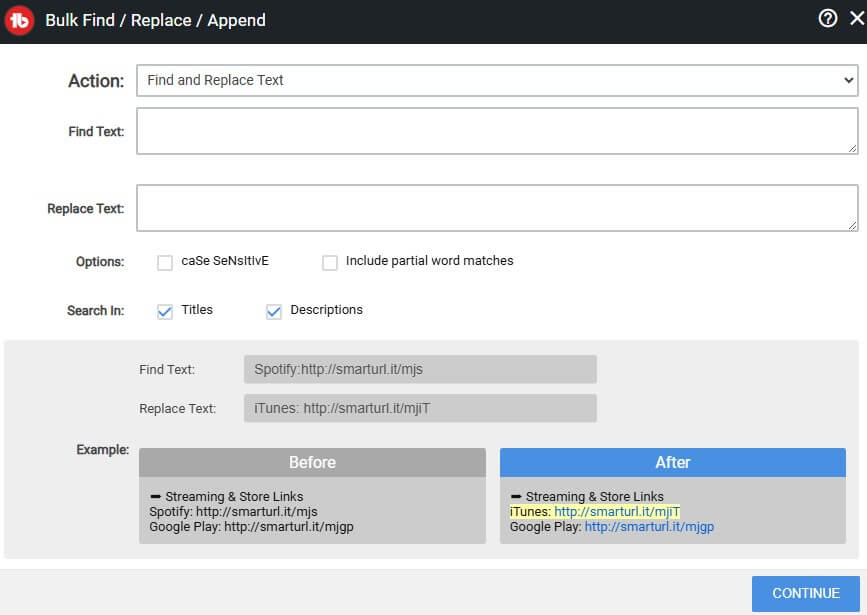
TubeBuddy lets you find specific text within video titles and descriptions, and then change it across all of them simultaneously, making it ideal for updating promo or affiliate links across selected videos.
It’s a vast improvement considering the native YouTube Studio lacks a bulk finder tool.
DashThis Tip:
User-generated content (UGC) platforms account for 47.5% of all AI citations — and YouTube leads the pack at 1.52%. To boost your chances of getting cited, cross check your video metadata with TubeBuddy’s built-in keyword tracker, then use the “Bulk Find, Replace, Append” tool to change your titles and descriptions accordingly.
While you’re at it, add time-stamped sections in your videos using the “Chapter Editor” tool. The more semantically aligned the metadata, the more likely AI systems can understand and retrieve it.
You can also edit end screens, cards, related videos, and thumbnail overlays in bulk.
Overall, TubeBuddy is excellent if you want to improve consistency or relevancy in evergreen videos without manual effort.
TubeBuddy’s top features:
- Batch tools: Bulk edit comments, demonetized videos, cards, end screens, thumbnail overlays, titles, and descriptions.
- Keyword Explorer: Assess how much effort is required for videos to appear in search results. TubeBuddy calculates keyword scores based on search volume, weighted competition, and optimization.
- A/B Test Manager: Run deep A/B tests to understand viewers and create content that connects. TubeBuddy tests which videos resonate based on watch time, CTR, engagement rate, and traffic sources.
- Easy-to-use batch editing tools
- Chrome extension brings TubeBuddy’s tools directly into YouTube
- Granular A/B tests for thumbnails, keywords, descriptions, and tags
- Organize and edit playlists quickly
- Polished and user-friendly dashboard
- Requires Enterprise plan to access unlimited bulk edits for end screens and cards
- Loads slow when bulk editing > 500 videos
Who TubeBuddy’s best for:
- TubeBuddy is best for creators or brands that already have a steady stream of views and leads, and want to refine their videos to scale even further.
- Choose TubeBuddy if you want to maintain a consistent brand identity, leading to higher search traffic, video impressions, and CTR on all existing videos.
Multi-marketing agencies managing 10+ YouTube channels: DashThis
Pricing: Starts with a 14-day trial with paid plans from $44/month on an annual subscription.
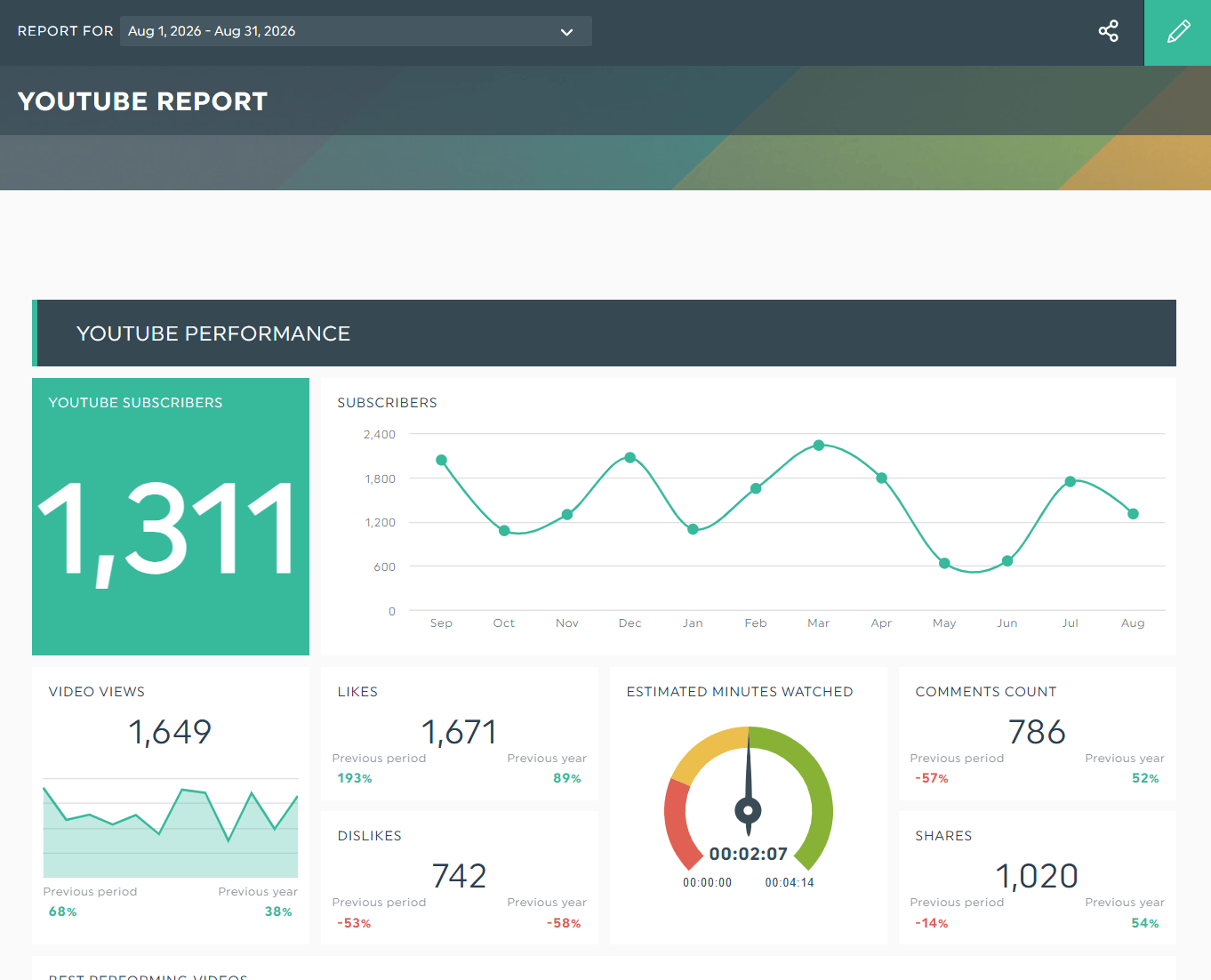
Grab this YouTube report with your own data!
DashThis automatically gathers your YouTube and other marketing data into a client-ready dashboard.
Using the YouTube analytics tool, you can turn metrics like Watch Time (Hours) and Average View Duration into colorful charts and graphs within seconds. DashThis also lets you layer in dimensions to give context to your numbers.
For example, Views with a Country dimension help you understand where viewers are watching your videos — it's valuable data that helps you decide which region-adjacent brands to partner with as part of your geotargeting efforts.
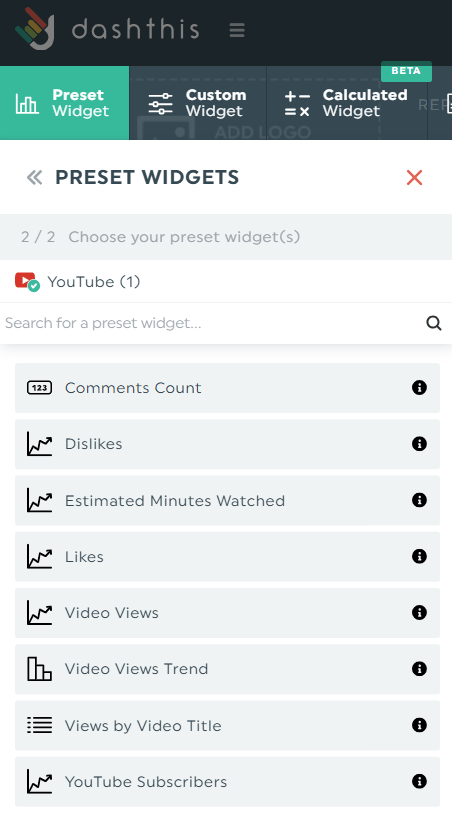
DashThis also excels as a multi-integration dashboard. With 34+ native integrations, it suits digital marketing agencies that require cross-channel reporting in an all-in-one automated marketing report.
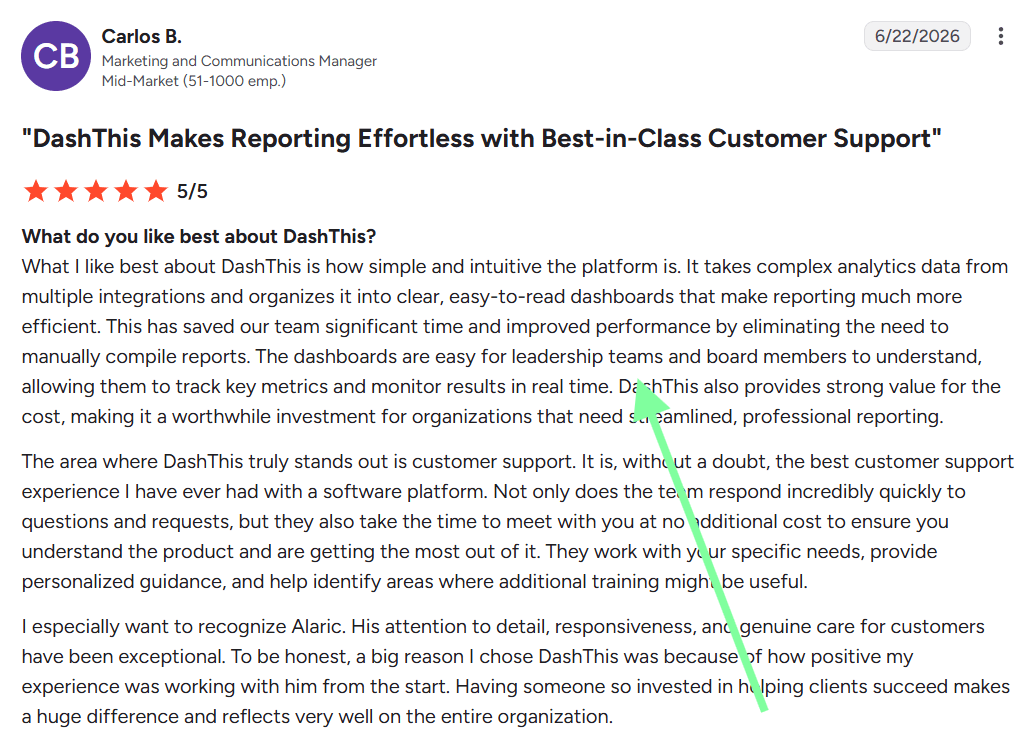
According to G2, a marketing and communications manager from a mid-market company uses DashThis to organize complex analytics data from multiple sources into clear and easy-to-understand dashboards.
Not only did it save significant time in reporting, leadership teams and board members can also track metrics in real time.
If you’re an agency strategist who needs to prove YouTube’s contribution to a multi-platform paid funnel, the executive report template comes in handy. You can populate YouTube KPIs directly, tying video performance back to revenue metrics like Customer Acquisition Cost (CAC) and pipeline growth.
DashThis’ top features:
- Premade YouTube report templates: Each template includes pre-built metrics such as views, likes and dislikes, shares, comment count, and subscribers gained and lost.
- White-labeled reporting: Display your client’s YouTube stats under your own brand. You can add your custom domain, theme, and email address.
- AI Insights: Analyze your marketing performance with one click. DashThis’ AI tool spotlight wins, issues, and optimization opportunities that you might’ve missed.
- Automatic email delivery: Automate your YouTube reports with a PDF copy directly in the email. You can also send a shareable link.
- Updates metrics every day automatically
- Built-in notes to provide context for each metric
- Clone and reuse YouTube reports for multiple clients
- Unlimited users and native integrations on all paid plans
- Subscription increases quickly if you require additional dashboards
Who DashThis is best for:
- DashThis is best for digital marketing agencies managing 10+ YouTube channels or running multichannel marketing campaigns simultaneously.
- Choose DashThis if you want to visualize how YouTube interacts with other marketing channels, combine metrics from different integrations into a single value, or prove video ROI over a period-over-period comparison.
Grab your free 14-day trial on DashThis today
Video ideation and validation for solo YouTubers: vidIQ
Pricing: Starts free with paid plans from $16.58/month on an annual subscription.
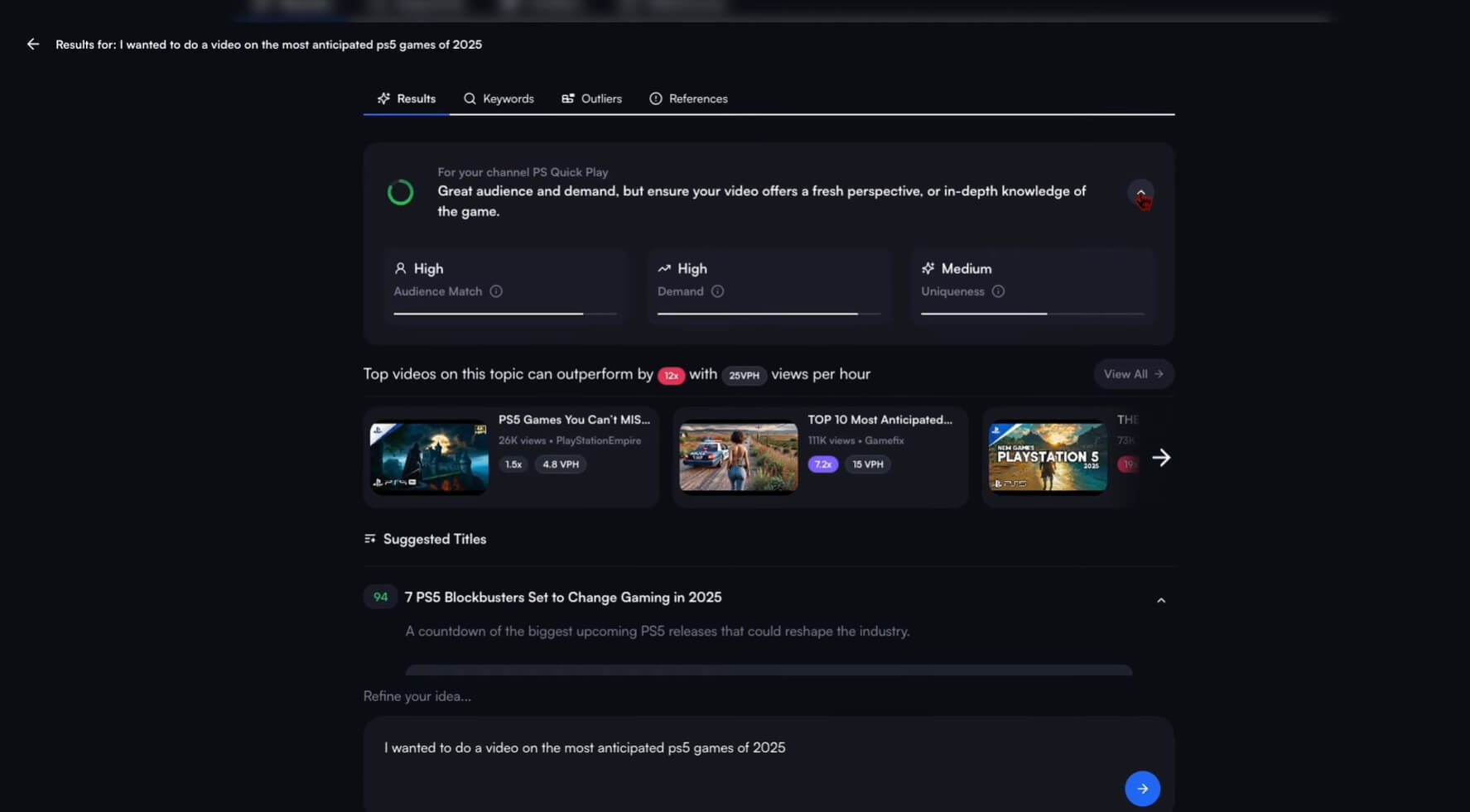
vidIQ suggests your next video idea based on competitors, trends, and your YouTube channel.
YouTube requires more resources than other marketing channels, so you need to be certain you’re getting your money’s worth.
vidIQ’s ideation tools are splendid in this case. The daily ideas and outliers feed helps you refine niche topics and identify video trends before they take off.
As for analytics, vidIQ monitors subscriber counts, milestones, and estimated earnings and revenue for any YouTube channel — it's useful if you want to benchmark against competitors.
vidIQ also tracks total views, watch time, endscreen click rates, and audience retention.
vidIQ’s top features:
- Outliers: Surface over-performing YouTube videos outside of their usual baseline. You can use filters like video length and publishing date to find relevant videos in your niche.
- Daily Ideas: vidIQ analyzes your videos and similar channels to identify emerging trends. It also suggests potential ideas to reinvent viral videos.
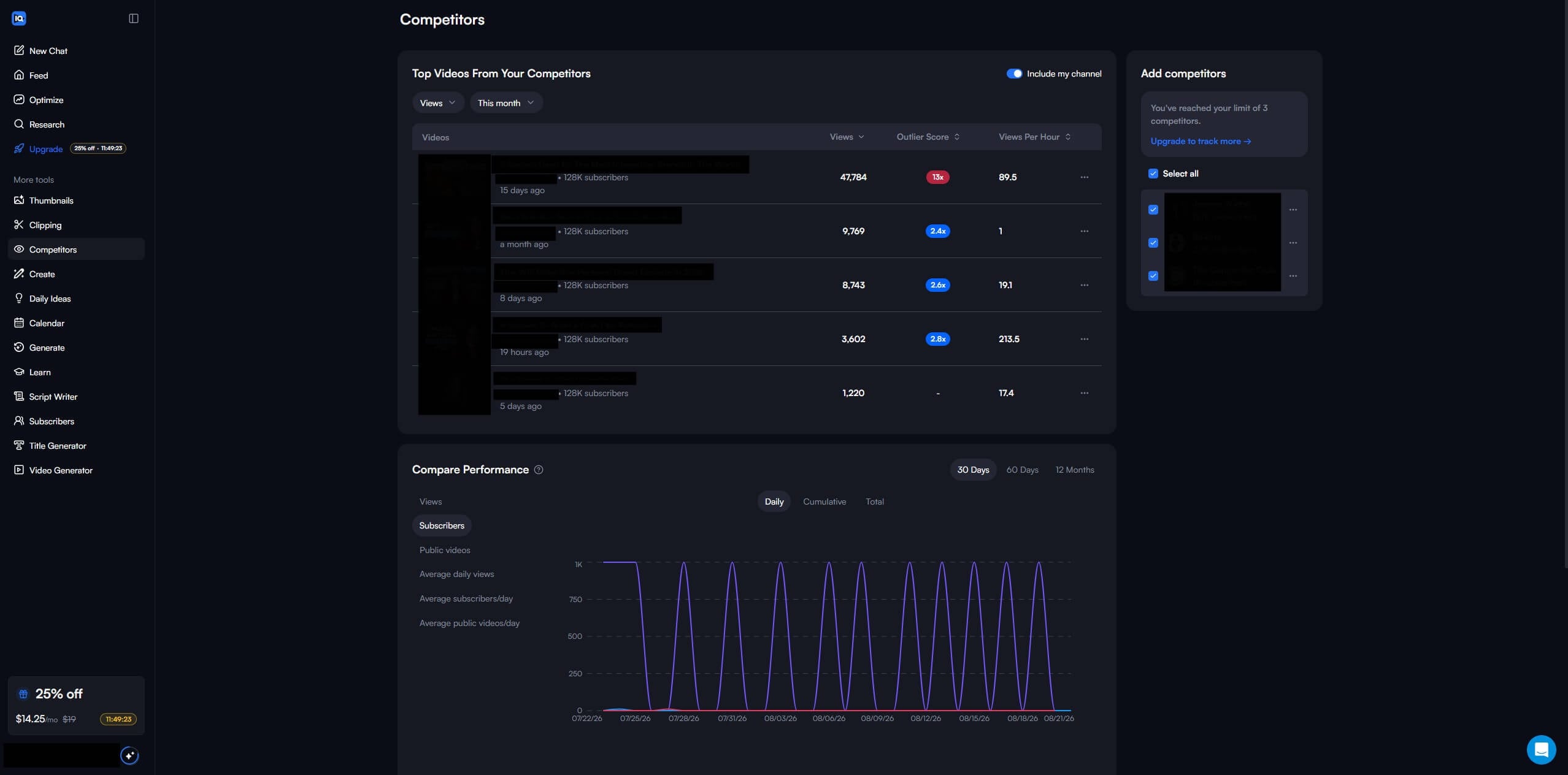
- Competitors: Compare competing channels based on views, subscribers, average daily views, etc. over 30 days, 60 days, or 12 months. The top-performing videos help you see what’s trending and plan your content calendar accordingly.
- Built-in calendar to organize videos and ideas
- Generous free plan offers most core tools
- Browser extension for Chrome, Firefox, and Microsoft Edge
- Subscriptions come with built-in Instagram
- Occasionally inaccurate keyword suggestions
- Erratic AI thumbnail creator
- Frequent upgrade pop-ups during onboarding
Who vidIQ is best for:
- vidIQ is best for independent YouTube creators who want to create high-intent videos their target audience is searching for.
- Choose vidIQ to detect emerging topics, spot content opportunities, and stay ahead of competing channels.
Brand marketing across YouTube and the web: Ahrefs Brand Radar
Pricing: Starts free for keyword generation, AI visibility, backlinks, etc. with paid plans beginning at $29/month.
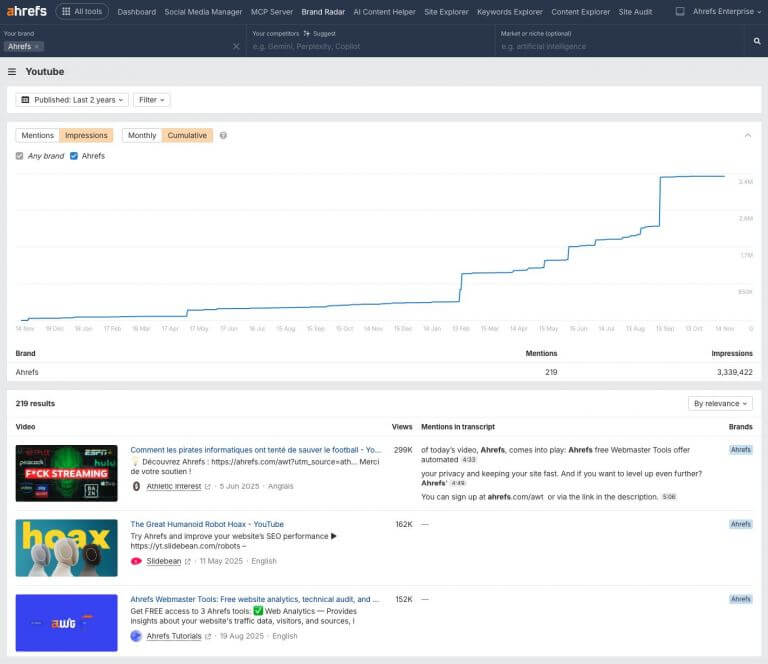
Ahrefs supports modern discovery across SEO, AI search, and social with a 16+ years worth of database.
Ahrefs is recognized for its backlink checker, but we’d argue the Brand Radar is just as valuable in modern search today.
On the YouTube index, you can track tagged and untagged video mentions to gauge the ROI of your branding efforts. The more video mentions your brand receives, the more authoritative it is in the industry.
Instead of loading the entire transcript, Ahrefs surfaces snippets where your brand is mentioned. You can deduce how YouTubers are describing your product and determine if they’re worth sponsoring or partnering with to grow your brand.
Ahrefs top features:
- Brand Radar: Ahrefs tracks brand visibility across YouTube, Reddit, and AI answers in one platform. On YouTube, you can track which video titles, descriptions, and specific sections in the transcript mention your brand.
- Keywords Explorer: Generate keyword ideas and instantly cluster them by related terms. You can quickly analyze whether the queries are worth ranking using Ahrefs’ proprietary metrics (e.g., keyword difficulty, traffic potential).
- AI database is supported by 405+ million search-backed prompts
- All paid plans include Brand Radar
- Shows snippets of YouTube transcripts for brand mentions
- Shows which videos are cited in AI answers in one view
- One of the most expensive marketing tools on the market
- Medium to steep learning curve to master workflows
Who Ahrefs Brand Radar is best for:
- Ahrefs is best for brand specialists who want to track their AI visibility funnel across the web.
- Choose Ahrefs if you want to track brand search demand, benchmark against competitors, and build brand authority through videos.
Social media management for enterprise social teams: Sprout Social
Pricing: 3-day free trial with paid plans starting at $79/seat per month on an annual subscription.
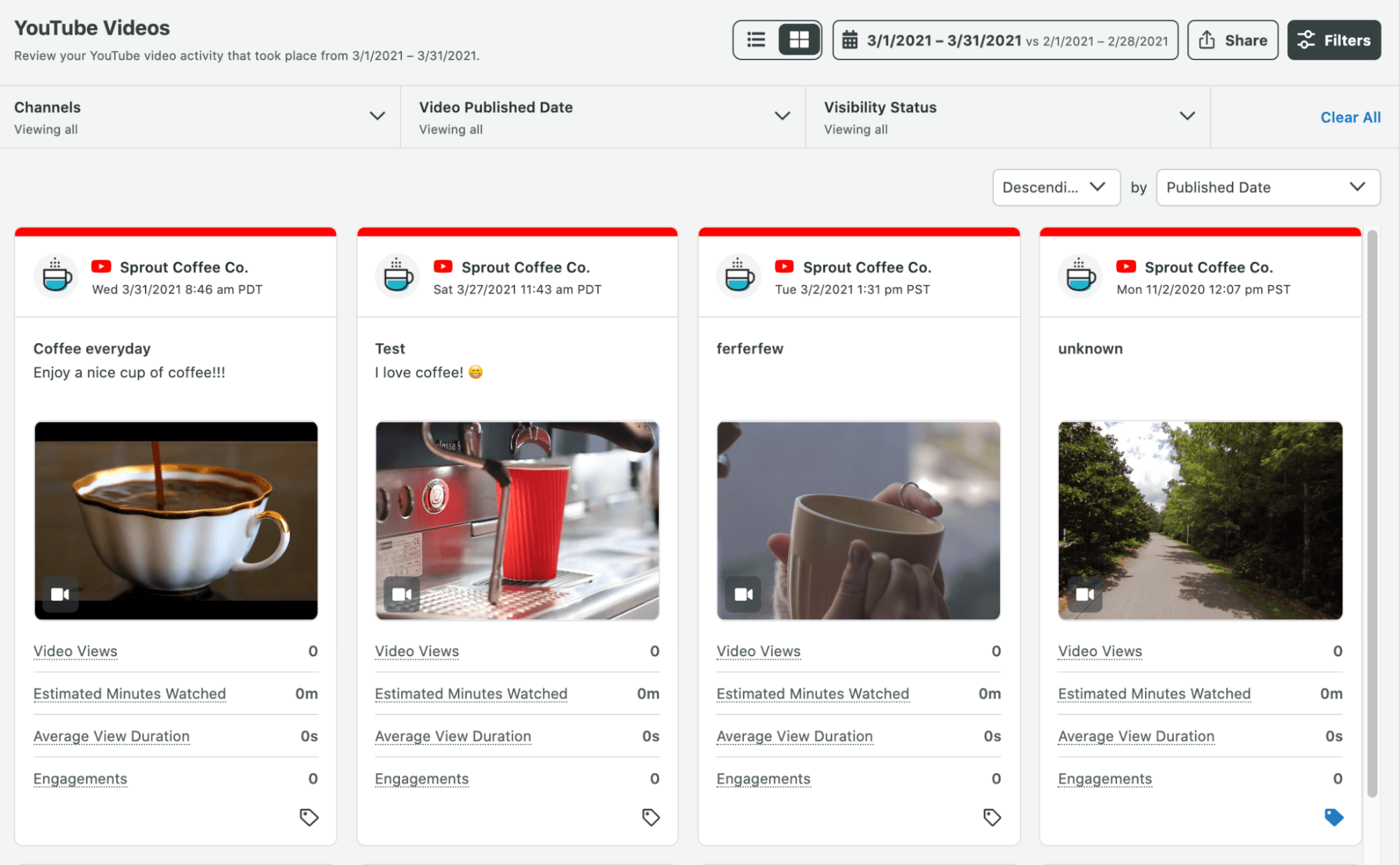
Sprout Social pulls your social accounts across YouTube, TikTok, Instagram, and more into a centralized suite.
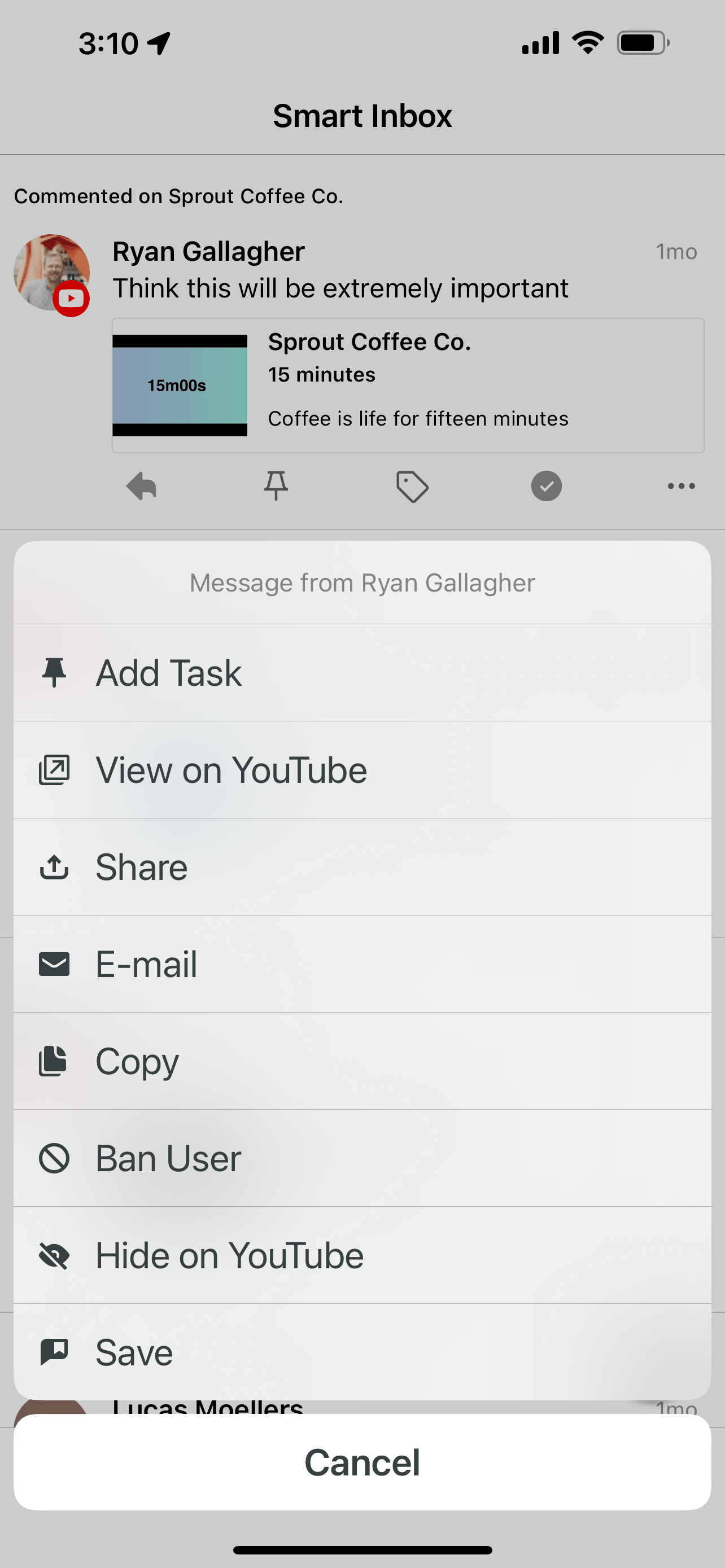
One of its strongest features is Smart Inbox, which organizes viewer comments across multiple YouTube profiles. You can respond to, delete, or report them as spam.
You can even add a task to a comment. Here, you might add an internal note or assign it to a team member for idea generation — it’s a useful tool if you want to tailor your videos according to what viewers want to watch next.
On the YouTube metrics front, Sprout Social tracks basic profile and post metrics: audience gained and lost, net audience growth, and total audience.
Sprout offsets the elementary metrics with its cross-network performance and inbox activity metrics.
Besides tracking organic and paid performance across channels, it provides a breakdown of your social care efforts.
Based on its varied toolset, Sprout Social is a solid choice for YouTube strategists often collaborating with paid media, UGC and influencers, and customer support teams.
Sprout Social’s top features:
- Smart Inbox: Manage comments from multiple YouTube channels directly on Sprout Social.
- Integration with social channels: Connect multiple profiles across YouTube, Instagram, LinkedIn, TikTok, X, Threads, Facebook, and Pinterest into one platform.
- Video publishing: Schedule and publish your YouTube videos at your optimal time.
- Profile and post metrics with backfill data for the last 30 days (except Total Audience)
- ViralPost® calculates best times to post videos
- Monitor brand search terms and phrases per group
- Offers social listening as an add-on
- Unable to upload custom thumbnails for YouTube Shorts
- Seat-based pricing can escalate quickly
- Free trial is only 3 days
Who Sprout Social is best for:
- Sprout Social is best for Heads of Social or YouTube strategists who want to monitor audience sentiment so they can understand what topics, formats, and hooks resonate with viewers.
- Choose Sprout Social to track video engagement, stay on top of conversations, and collaborate with cross-functional teams to plot your next video or content strategy.
What features should I look for in a third-party YouTube analytics tool?
Look for features like keyword and idea discovery, advanced A/B testing, automated workflows, and cross-platform KPIs and metrics in a third-party YouTube analytics tool.
That way, you understand why certain videos work and always stay ahead of the YouTube algorithm.
- Keyword and idea discovery: Select a YouTube analytics tool that suggests untapped keywords and video topics. It should complement the core metrics in the native YouTube Studio and help you identify the next big idea.
- Advanced A/B testing: Get a YouTube analytics tool that tests titles, thumbnails, and formats with metrics you can choose to define success.
- Automated workflows: Choose a YouTube analytics tool that speeds up manual tasks like reporting. You free up time to develop video concepts and interact with viewers.
- Cross-platform KPIs and metrics: Pick a YouTube analytics tool that natively connects with other marketing platforms if you’re running a multichannel marketing campaign. That way, you can measure ROI across channels and determine what actually caused a sale.
Which YouTube analytics tool should I use?
The best YouTube analytics tool is the one you’ll use. TubeBuddy works best for bulk video metadata edits; DashThis is ideal for multimarketing agencies with 10+ YouTube channels; and Sprout Social fits enterprise social teams managing multiple profiles with other departments.
If you’ve reached the stage where you need multiple analytics tools, DashThis is for you.
DashThis automatically pulls your entire marketing data, like YouTube, LinkedIn, and Google Ads, into one client-ready report.
All paid plans include unlimited users and native integrations, pre-built templates, AI Insights, and automated reporting.

Read More

Don’t miss out!
Follow us on social media to stay tuned!


Automate your reports!
Bring all your marketing data into one automated report.
Try dashthis for free