TL;DR:
- BrightLocal is best for multi-location specialist businesses seeking local SEO reporting; DashThis is ideal for automated SEO and multi-channel reporting for agencies with 10+ clients; Ahrefs is the industry standard for advanced backlink audits reporting; SEO Gets offers the easiest way to report GA4 and GSC in a unified view; and Screaming Frog shines in deep technical SEO audits reporting for large websites.
- Choose SEO reporting tools with multi-integration, data visualization, automated reporting, and white-label capabilities.
Pricing is verified as of 3rd September 2026.
| SEO reporting tools |
Free trial |
Annual pricing |
Best for |
| BrightLocal |
14 days |
$31/mth, $2-$3.50/listing |
Citation campaigns and local SEO reporting for multi-location specialist businesses |
| DashThis |
14 days |
$44/mth |
Automated SEO and multi-channel reporting for agencies with 10+ clients |
| Ahrefs |
Free plan |
$29/mth |
Advanced backlink audit reporting for content teams |
| SEO Gets |
Free plan |
$32.50/mth |
Quick GA4 and GSC reporting for growth-stage companies |
| Screaming Frog |
Free plan |
$279/license |
Deep technical SEO audit reporting for large websites with 1,000+ URLs |
SEO reporting tools come in different forms. While some offer automated email dispatches, others push you to export raw data in spreadsheets.
This guide covers some of the most popular SEO reporting tools today. Though the features and pricing vary, we’ve vetted that all of them make a strong case for validating your SEO efforts to stakeholders confidently.
Citation campaigns and local SEO reporting for multi-location specialist businesses: BrightLocal
Pricing: 14-day free trial with paid plans starting at $31/month on an annual subscription. Citations are purchased separately at $2-$3.50 per listing.
Source
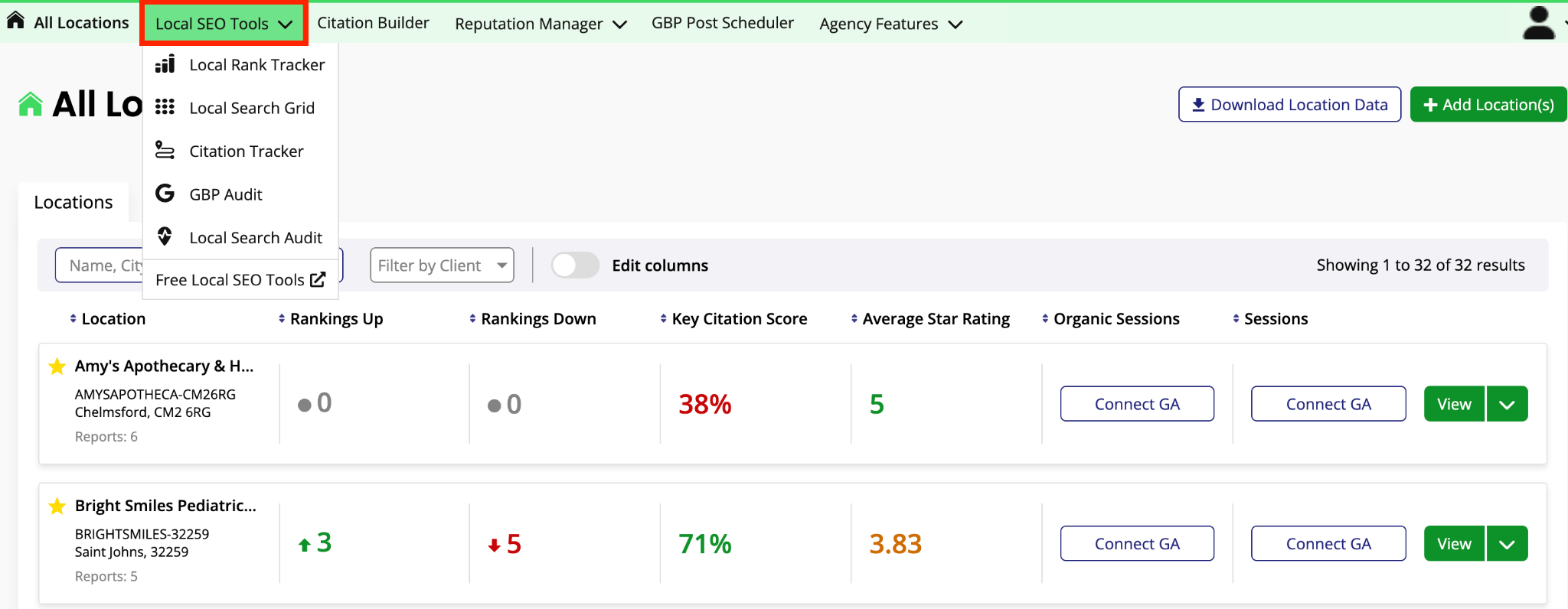
BrightLocal brings your business citations and local SEO presence into one report.
The different types of reports include: local search audits, Google Business Profile (GBP) audits, reputation management, local ranking, citation tracking, and citation campaigns.
You can view specific reports across multiple locations or all reports connected to a location. This helps you analyze which specific regions drive the most sales and allocate budget accordingly.
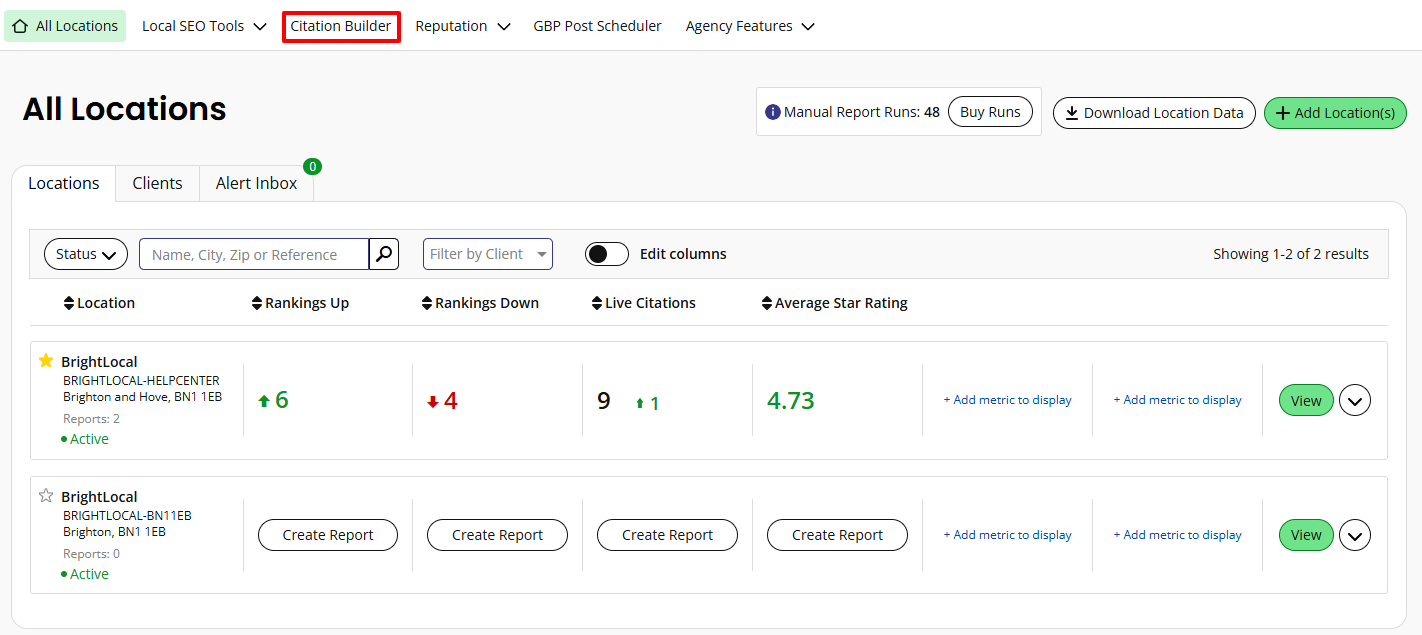
BrightLocal stands out with its handpicked citation building service.
Typically, automated local SEO platforms target only big sites, potentially missing industry-specific directories.
Since BrightLocal manually submits your business information to local directories, it’s a terrific fit for specialist businesses that seek citations and want to improve local footprint across hyper-niche marketplaces.
Source
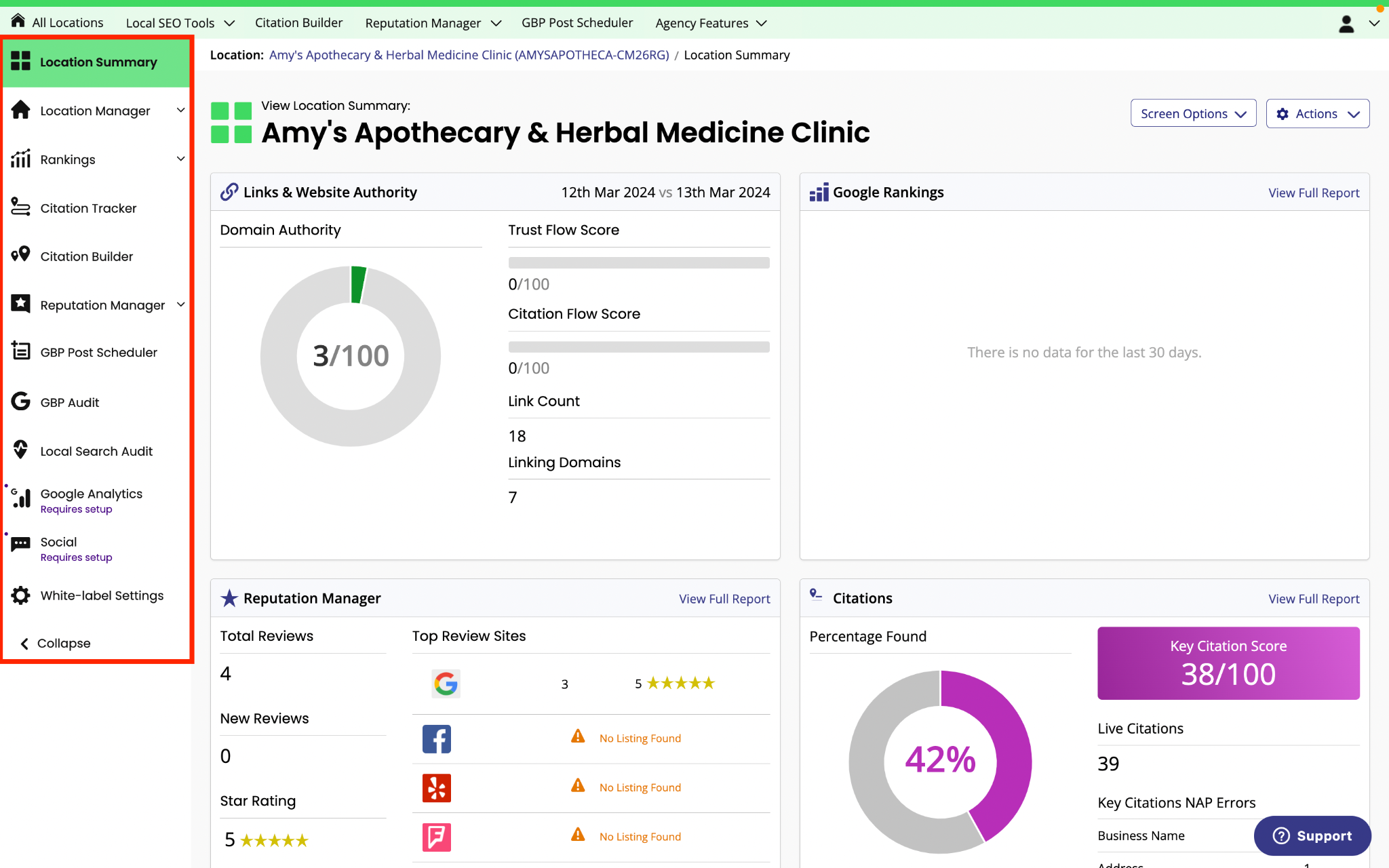
BrightLocal’s top features
- Local Search Grid: Compare your local SEO ranking against competitors block by block. The grid reports show where you’re losing visibility, breaking down the ranking signals behind each performance.

Source
- Citation Builder: BrightLocal manually submits your business information to 1,000+ industry directories at a $3.50/citation fee (or $2/citation for bulk purchases). The citations are yours forever, with no ongoing fees.
- White-label reports on all plans.
- Zero recurring costs for citations.
- User-friendly interface (e.g., shows average ranking for keywords within a specific mile radius).
- BrightLocal MCP Server distills insights from local SEO data.
- Local Rank Tracker covers only four competitors per location.
- Only highest-tier plan offers review and reputation management.
Who BrightLocal is best for
- BrightLocal is best for specialist businesses or digital acquisition managers tasked with improving local search presence across multiple locations to drive site traffic, calls, and in-person visits.
- Choose BrightLocal if you want to build hyper-relevant citations, track local rankings for specific queries, and manage dozens of locations without breaking budget.
Runner-ups:
- WhiteSpark for small businesses with individual local SEO tools usage. Pricing for local ranking grids starts at $10/month, and custom citations are $20+ per location (one-time fee). A 14-day free trial is available for the local rank tracker and reputation builder.
- SEMrush Local for enterprises requiring local SEO management, AI visibility, competitor research, content analysis, ads, and social in one ecosystem. A 7-day free trial is available for paid plans starting at $30/location per month on an annual basis.
Automated SEO and multi-channel reporting for agencies with 10+ clients: DashThis
Pricing: 14-day free trial with paid plans starting from $44/month on an annual subscription.
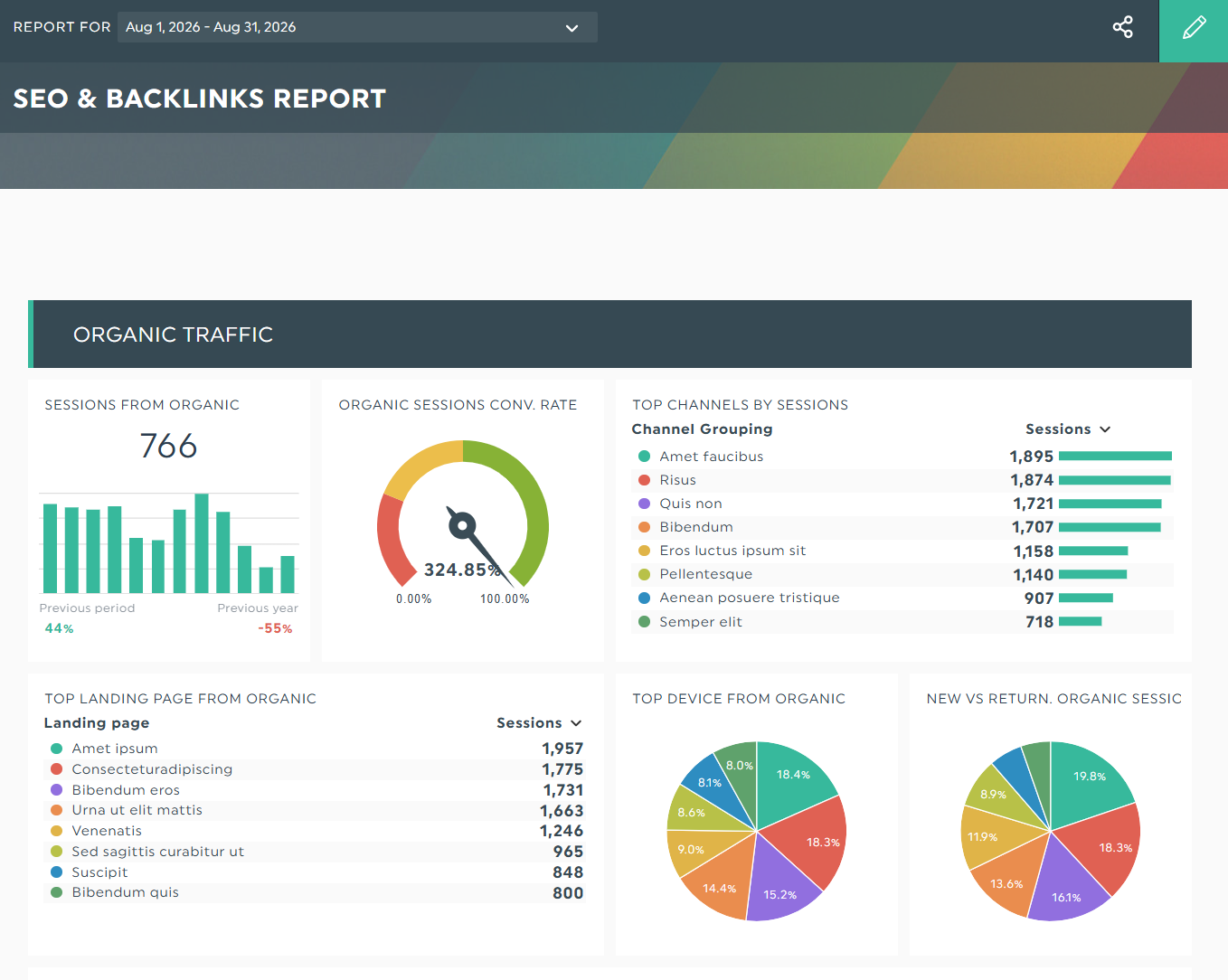
Grab this SEO reporting template with your own data!
DashThis automatically gathers all your SEO metrics into a beautiful, clutter-free dashboard.
The SEO reporting software auto-translates your raw data into vibrant charts and graphs, illustrating how site traffic has changed over time. At a glance, you can clearly see how each metric influences visibility, engagement, and conversions.
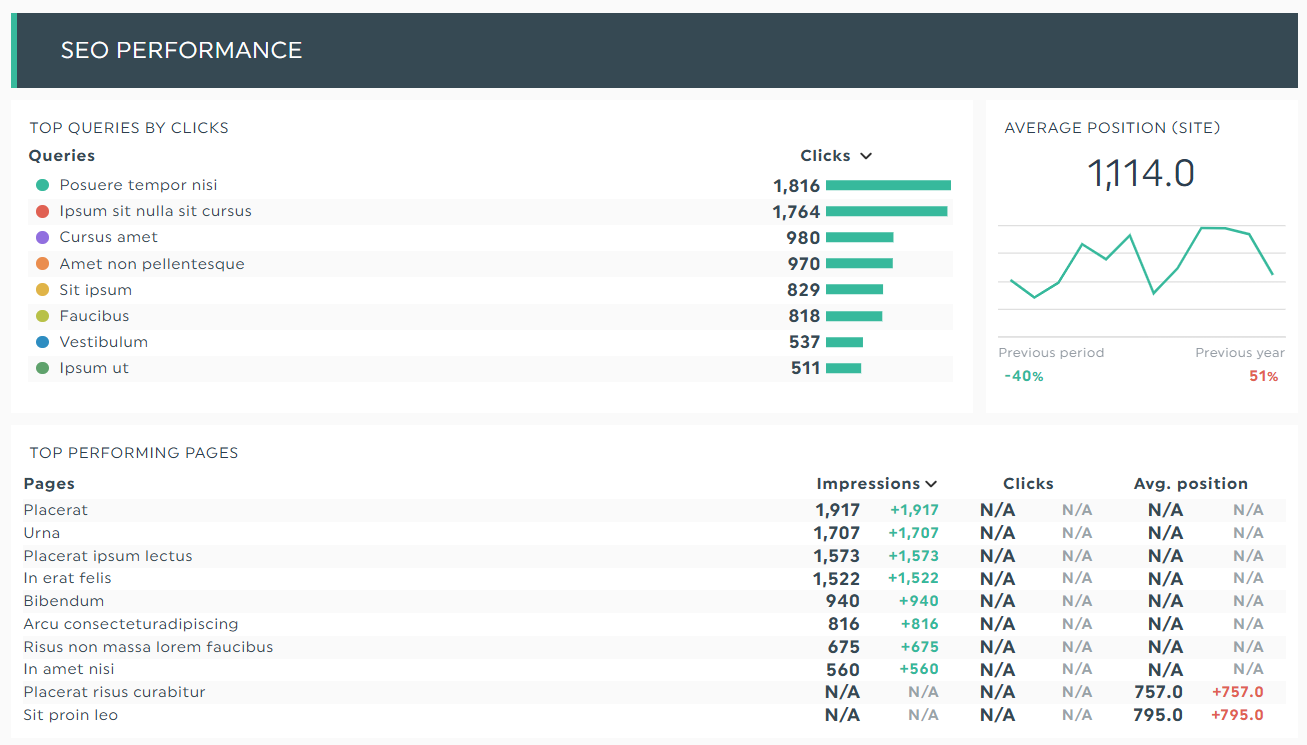
DashThis natively connects with 34+ marketing platforms, so setting up a standalone SEO report (or even a multi-channel marketing dashboard) takes only a few clicks.
Choose a ready-made template with pre-built metrics or KPIs listed according to popularity. Once clicked, DashThis automatically pulls the metrics into the report. Drag and drop them as you desire.
You can merge different SEO sources into one widget to show the overall impact.
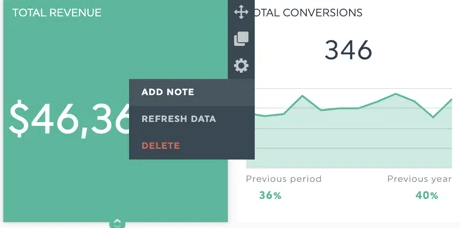
To provide additional context, include notes in individual metrics. It’s a neat trick to explain unusual traffic spikes without requiring the stakeholder to leave the platform.
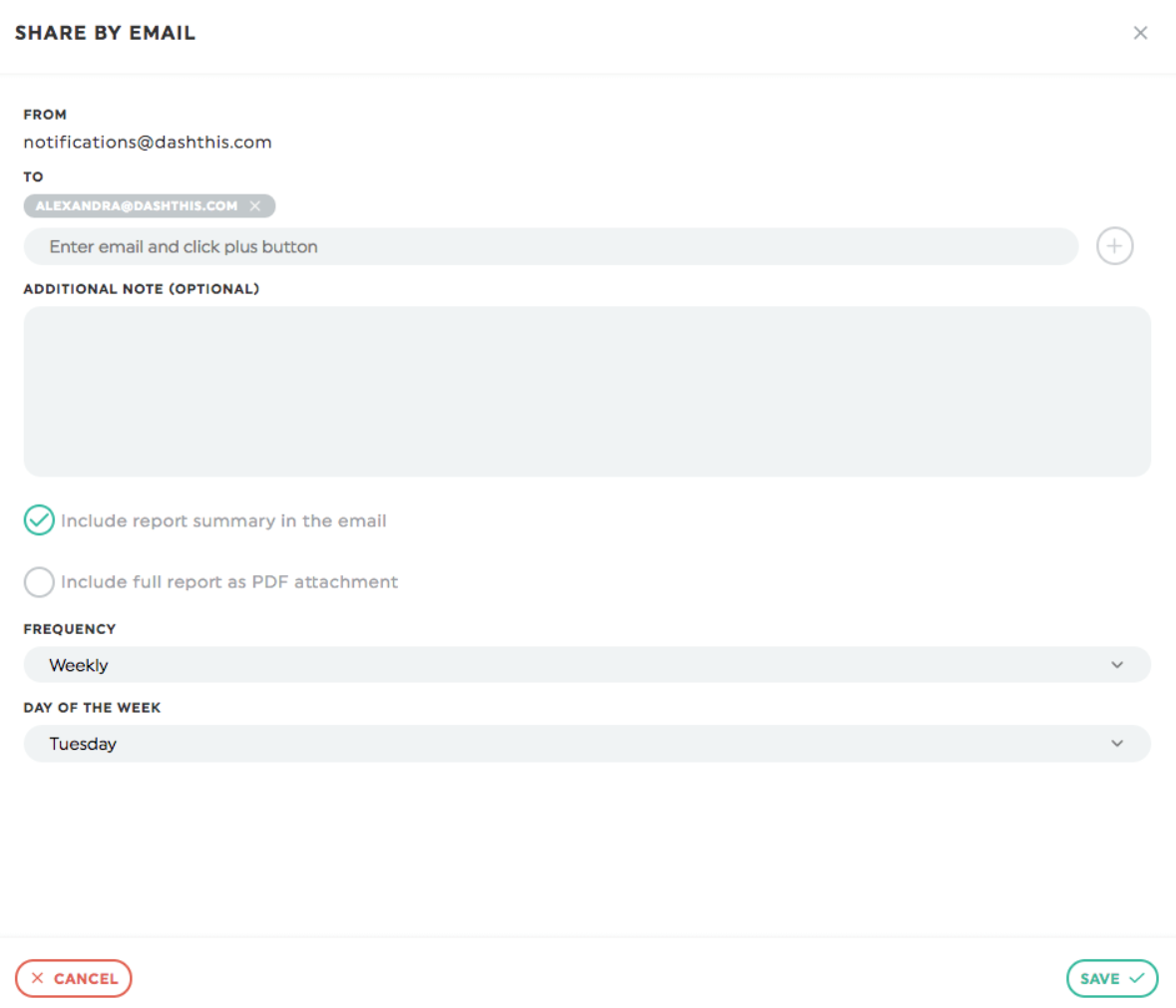
Reporting is quick and easy as well. DashThis lets you share your SEO dashboards via email on an automated “set it and forget” schedule.
When Jelly Marketing automated its entire marketing data across SEO, PPC, social media, and PR on DashThis, it saved over 20 hours of work every month. Now, the team spends its time on campaign optimization instead of endless copy-pasting.
Overall, DashThis is ideal for both SEO and full-service marketing agencies that want to reclaim time in assembling manual reports across a large client base.
All paid plans include unlimited users and integrations. Start your free 14-day trial on DashThis today.
DashThis’ top features
- Automated client SEO reporting: Share your SEO dashboards via email on your preferred schedule. Or generate a shareable link. Whichever reporting option you pick, DashThis updates your SEO dashboard with fresh data automatically.
- Customizable SEO dashboards: Use the SEO report template with pre-built metrics instead of starting from scratch. Add or remove the metrics as you desire. You can also clone and reuse the dashboards for future use.
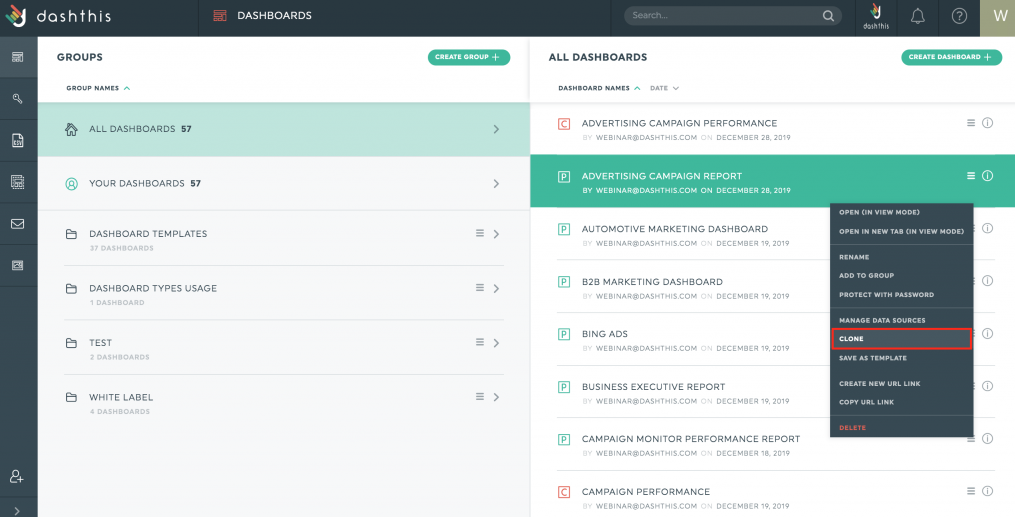
- White-labeled dashboards: Create white-label SEO reports no matter what plan you’re on. You can add your brand colors, logo, domain, comments, and images in an environment that’s uniquely yours.
- Native integrations: DashThis natively connects with 34+ of the most popular marketing platforms, including SEO tools like GA4, GSC, Ahrefs, GBP, SEMrush, Moz, and Keyword.com.
- White-labeled dashboards on all plans
- Automated data updates
- DashThis MCP Connector answers questions about SEO health, gaps, and opportunities.
- CSV file manager uploads custom metrics (e.g., visibility data from AI Overviews)
- Offers both email dispatch and shareable link in reporting.
- Costs increase quickly with more dashboards.
- Need to re-apply custom color theme when cloning dashboards.
Who DashThis is best for
- DashThis is best for SEO and multi-marketing agencies seeking a unified dashboard to compare performance, spot traffic trends, and automate reporting in a few clicks.
- Choose DashThis if you want to bring all of your marketing data together in one dashboard, analyze how SEO interacts with other channels, and easily manage reporting for multiple clients.
Advanced backlink audit reporting for content teams: Ahrefs
Pricing: Starts free with paid plans from $29/month.
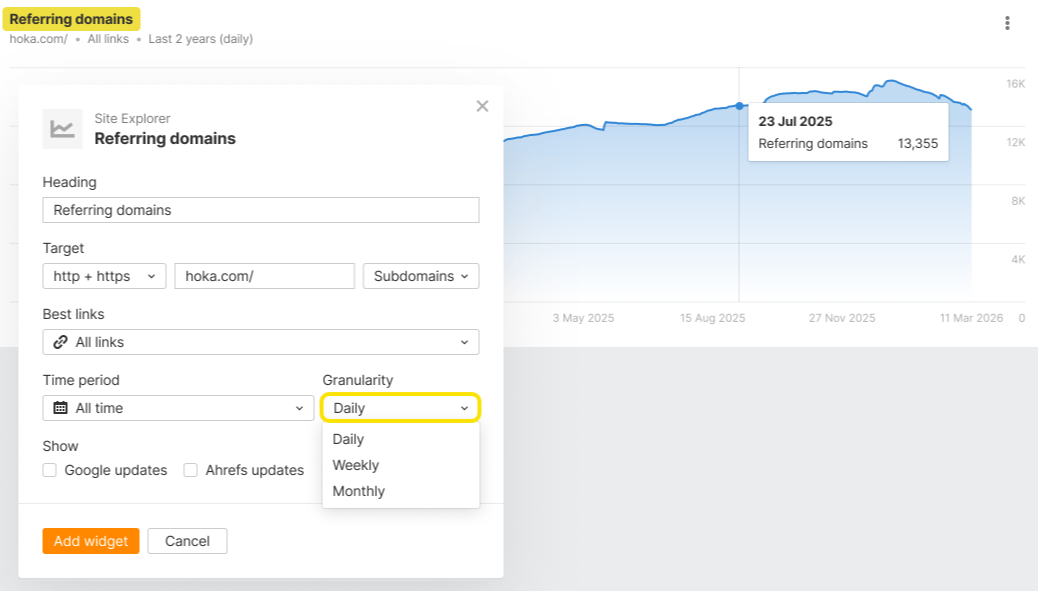
Source
Ahrefs is a modern discovery platform that drives web visibility. Despite that, it's best known for link-building, thanks to its 35 trillion backlink database.
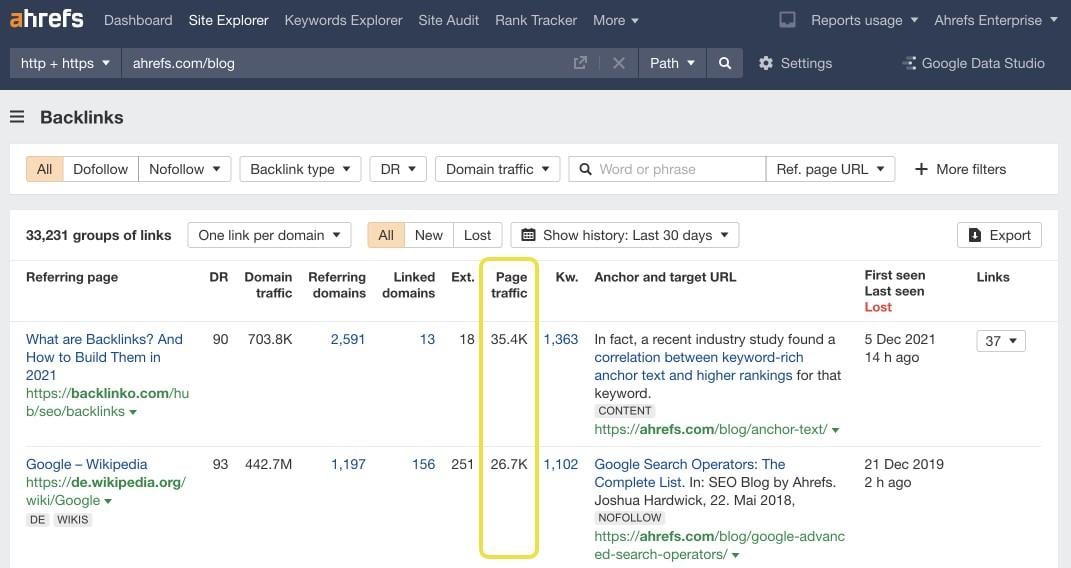
You can view the domain and page metrics for any website, URL, or subsection. Each target’s backlink profile includes proprietary SEO metrics like Ahrefs Rank (AR) and Domain Rating (DR), further sorted through filters.
This makes it easy to assess the popularity of any linked page or referring domain.
The estimated organic traffic to each linking page, for starters, helps link builders determine which placements are worth pursuing and how likely they will improve rankings and authority.
On the SEO reporting front, we’re a fan of Portfolios, a tool that groups and monitors up to 1,000 URLs in one report. It’s an excellent use case for content teams that want to group articles by writers and see who’s driving the most backlinks.
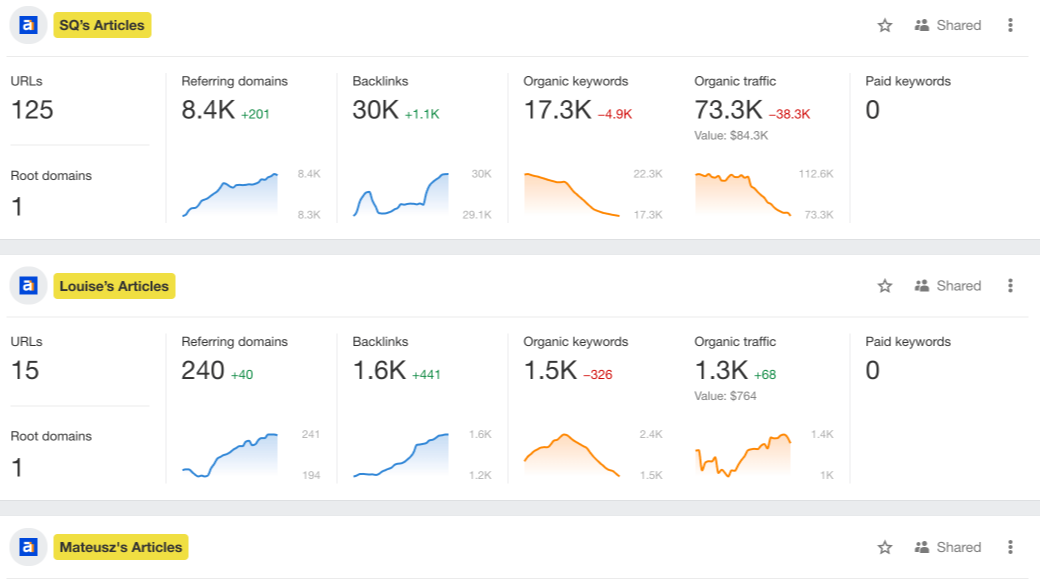
Source
Ahrefs’ top features:
- Site Explorer: Analyze organic traffic, AI visibility, backlink profile, and paid traffic for all websites across trillions of data.
- Keywords Explorer: Analyze your search queries on a granular level. Ahrefs supports 28.7 billion topics for keyword research, ensuring a constant stream of content ideas.
- Previews next 3 scheduled reports before sending.
- World’s largest backlink index.
- Backlink database updates every 15–30 minutes, surfacing fresh link placements daily.
- Ahrefs MCP automates a wide range of SEO tasks.
- Daily reporting schedule is limited to workdays only.
- Starter plan offers only one report per month.
Who Ahrefs is best for:
- Ahrefs is best for SEO managers or link-building specialists scaling link-building operations.
- Choose Ahrefs if you need an advanced SEO suite that helps you spot premium backlink opportunities, track organic traffic longevity, and replicate top-performing content strategies.
Runner-ups:
- SEMrush (an Adobe Company) for extensive competitor analysis, keyword research with monthly search volume, and backlink analysis. Starts free with paid plans from $117.33/month on an annual subscription.
- SE Ranking for rank tracking, basic backlink monitoring, keyword tracking, and site audits. 14-day free trial with paid plans beginning at $103.20/month annually.
- Moz Pro for keyword suggestions and technical site audits. 7-day free trial with paid plans starting at $79/month annually.
Quick GA4 and GSC reporting for growth-stage companies: SEO Gets
Pricing: Starts free with paid plans starting at $32.50/month on an annual subscription.
Source
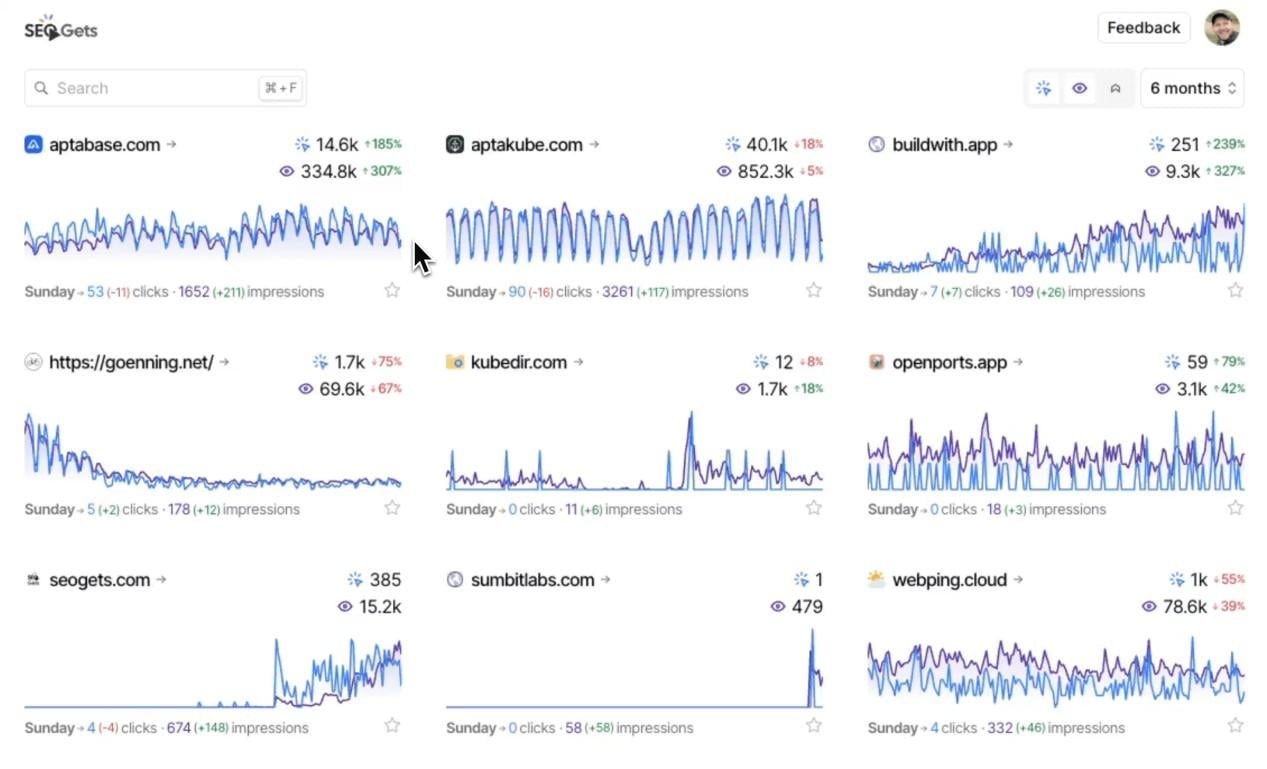
SEO Gets combines your Google Analytics 4 (GA4) and Google Search Console (GSC) properties in one master view.
You can access up to 50,000 rows of data — a vast improvement from GSC’s 1,000-row capped limit. The 5-year historical data window makes it easy to surface seasonal trends you may have missed.
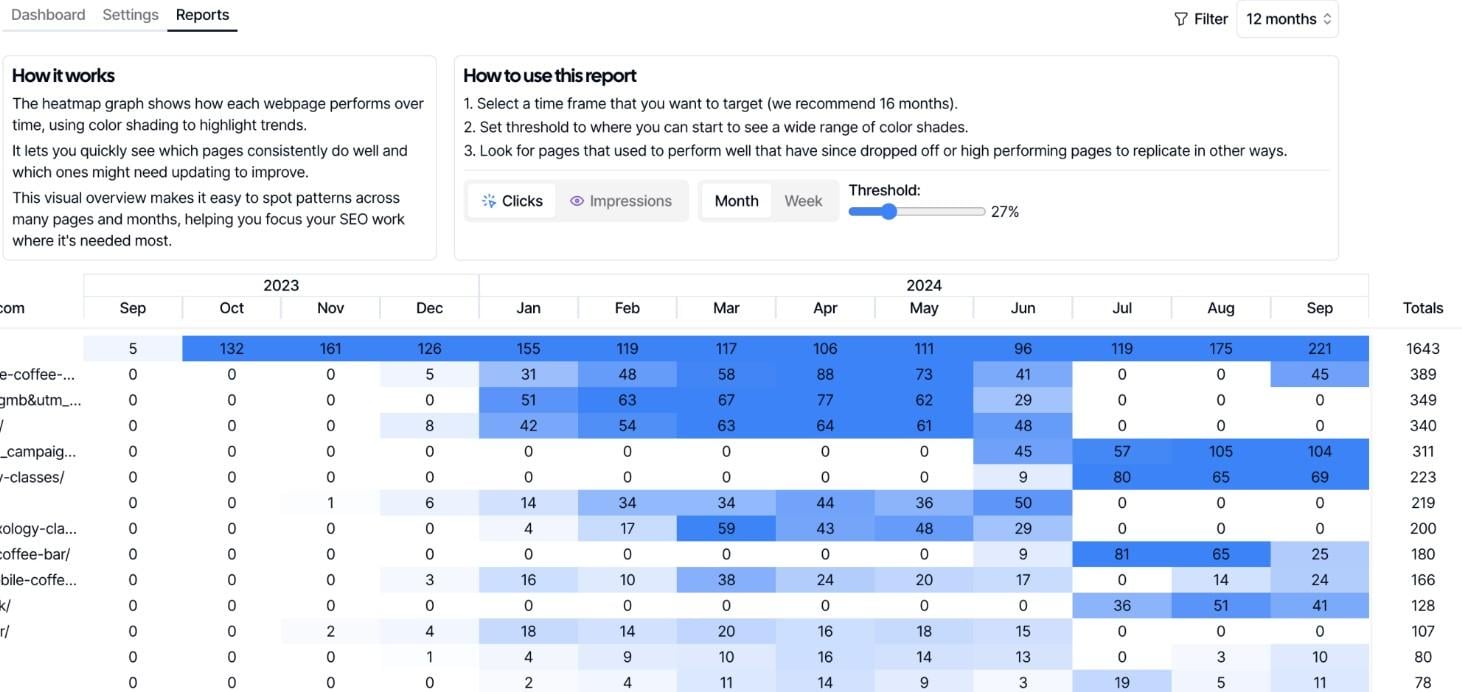
Identifying content decay is easy. The heatmap shows which pages are losing traffic in different color shades. Right away, you can spot patterns and deduce which pages require updates.
Source
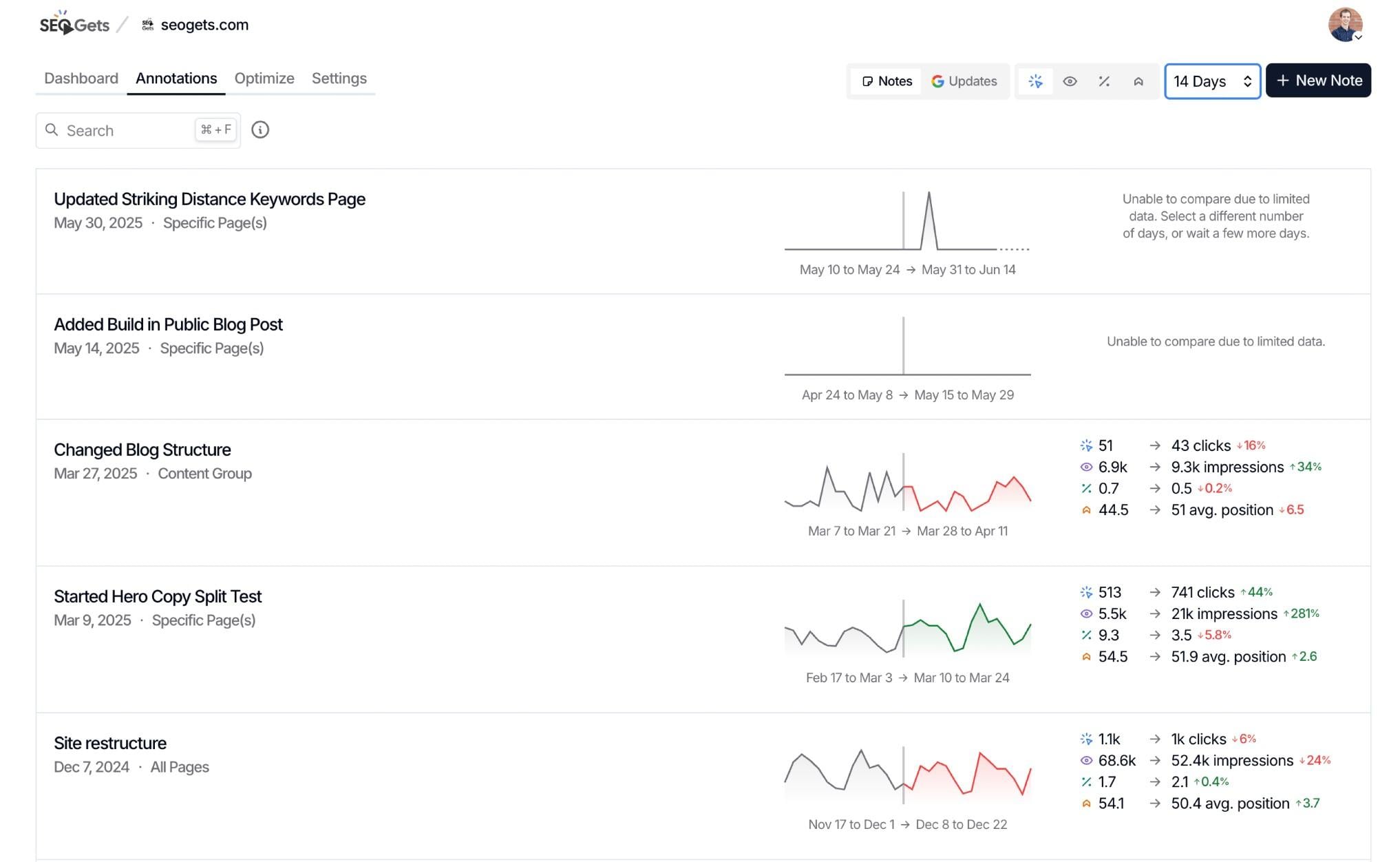
SEO Gets is built with efficiency in mind. It also lets you annotate directly on any points in the performance graph. That way, you can provide context and connect every action to traffic changes.
Source
The annotations show up in reports. Through a shareable link, stakeholders can see a real-time snapshot of what drives changes to the site traffic.
Source
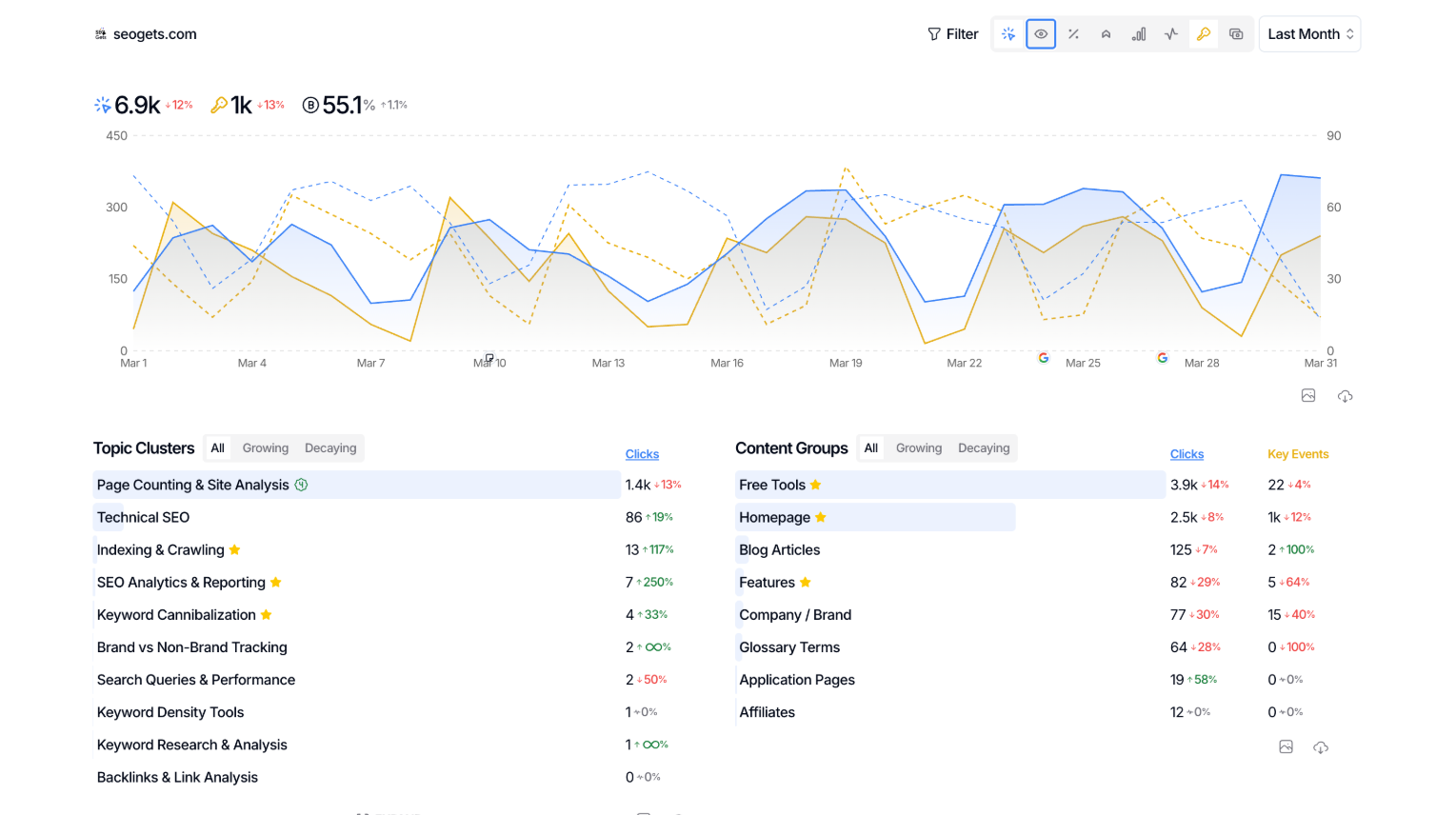
One interesting quirk about SEO Gets’ reporting is metrics selection. While you can add any of the GSC or GA4 metrics, you’re limited to only four at a time. This presses you to keep the SEO reports compact, which doesn’t hurt if you report to time-strapped stakeholders.
SEO Gets’ top features:
- Content Groups: Group related pages by topic, page type, or funnel stage — and analyze traffic to assess your cumulative progress. You can see which pages of similar themes are growing or decaying at a quick glance.
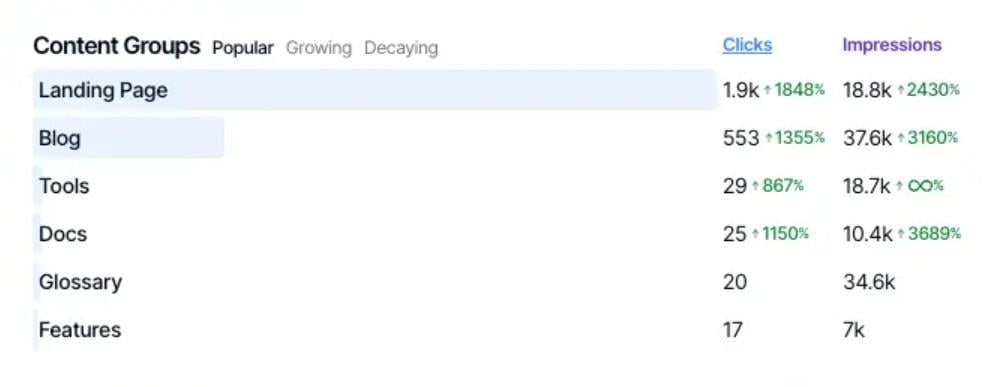
Source
- Topic Clusters: Track how your related keywords collectively fluctuate over time. Since SEO Gets measures cluster-level performance, you can report on pillar-cluster strategies clearly instead of isolated keyword rankings.
- Built-in annotations in reports.
- Unlimited connected sites, even on free plan.
- Tags organize sites by campaign type, client, or any category that applies to your business.
- SEO Gets MCP contextualizes your GSC data.
- One-click setup for content groups, topic clusters, and branded keywords.
- Need to regenerate shared link after dashboard updates.
- Reporting is limited to a selection of four metrics at a time.
Who SEO Gets is best for
- SEO Gets is best for SEO strategists in growth-stage companies seeking a user-friendly platform that shows the most important GA4 and GSC metrics in one report.
- Choose SEO Gets if you want to focus on minimal metrics that drive impact or view aggregated performance data across multiple websites.
Runner-ups:
SEOTesting for tracking site performance changes in time-based SEO and LLM tests. Pricing starts with a 14-day free trial, with paid plans from $50/month.
Deep technical SEO audits reporting for large websites with 1,000+ URLs: Screaming Frog
Pricing: Starts free with paid version from $279/license on an annual subscription.

Source
Screaming Frog is the most popular website crawler for technical SEOs.
It scans the raw HTML of your website, identifying 300+ SEO issues to improve your UX and overall website health.
Managing websites with ongoing changes is a tedious task. Whether it’s content pruning, redesigns, or CMS migration, these changes compound and cause issues like redirect loops and chains.
Screaming Frog’s extensive crawler takes care of that — it can spot mistakes other webmaster tools often miss.
As for reporting, Screaming Frog offers two options: export data into spreadsheets or automate crawl reports in Google Data Studio (formerly Looker Studio). For the latter, you can track on-page elements (like duplicate title tags), monitor sitewide indexability, and identify sitemap validation errors.
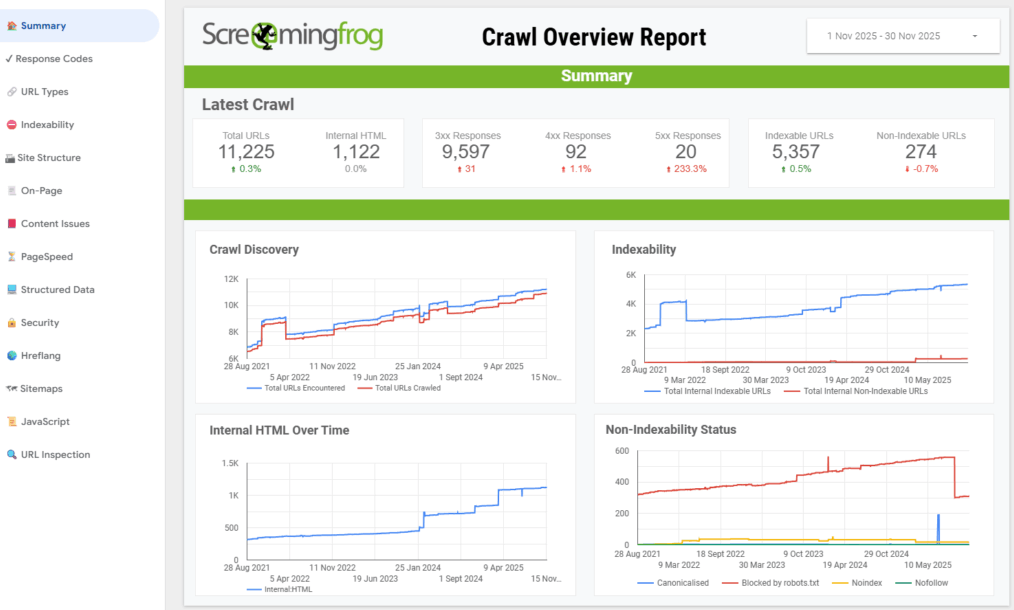
Source
Screaming Frog’s top features
- Broken Links, Errors, and Redirects: Identify broken links (404s) and server errors. Spot redirect chains and loops, temporary and permanent redirects in a site migration.
- Duplicate Content: Pinpoint duplicate URLs or even partially duplicated elements (e.g., page titles).
- Free to download and use.
- Extensive SEO crawler.
- MCP automates crawl-related tasks.
- Available on Windows, Mac, and Linux.
- Only up to 500 URLs per crawl in free version.
- Outdated interface.
Who Screaming Frog is best for
- Screaming Frog is best for webmasters and technical SEOs who want quick SEO wins and are comfortable working with a large volume of raw data.
- Choose Screaming Frog if you want to recover search value, help search engines understand your site, and improve the overall user experience.
Runner-ups:
- LibreCrawl for crawling unlimited URLs, real-time memory profiling, custom CSS injection, and multi-session support. This free SEO crawler is open source; you can modify and host it on your own infrastructure.
- Sitebulb for data visualization, customized PDF reports, and desktop and web-based site crawling. A free 14-day trial is available, with paid plans starting from $180/user annually.
What features should I look for in an SEO reporting tool?
Look for multi-integration, data visualization, white-labeled dashboards, and automated reporting. Agencies consider these features non-negotiable in an SEO reporting tool.
- Multi-integration: Connect with your favorite SEO tools to automate your workflows. If you want to see how SEO interacts with other channels, DashThis natively integrates with your favorite marketing platforms and pulls your entire data into one report.
- Data visualization: Most stakeholders are non-data specialists. Choose an SEO reporting tool that automatically turns your raw data into digestible graphs and charts. That way, everyone can make sense of site performance at a glance.
- Automated sharing: Automate SEO dashboards on your preferred schedule. Pick SEO reporting tools like DashThis offering email dispatch or shareable URL links with automatic data refresh.
- White-labeled dashboards: Spotlight your agency brand from the login screen to reporting. Choose an SEO reporting tool that lets you add your logo, colors, and domain.
FAQs
What’s the cheapest SEO tool?
Google Analytics 4 (GA4) and Google Search Console (GSC) are completely free, making them the cheapest SEO tools for budget-strapped practitioners. Screaming Frog and SEO Gets offer free plans but with limited features.
What are the best SEO tools with white-labeled client portal?
DashThis and SE Ranking are some of the best SEO tools offering white-labeled client portals. With DashThis, you can display your SEO data in a dashboard in your brand colors, logo, and domain. Similarly, SE Ranking offers custom colors, logo, and domain in a fully branded environment.
What should be included in an SEO report from a marketing agency?
An SEO marketing agency report should include a campaign summary, SEO performance metrics, key takeaways, and the next campaign’s action items. Clients value the bottom line, so always keep revenue growth in mind as you create each section.
What are the common metrics measured in SEO and GEO reports?
The common metrics in SEO reports include domain authority, average position (website), organic search visits, click-through rate (CTR), keyword ranking changes, new vs. returning visitors, conversion rate, and top-performing landing pages.
On the other hand, the common metrics in GEO reports include share of model voice (SOMV), citation frequency, prompt coverage, branded search lift, and pipeline influenced by AI-discovery queries.
What are the best practices for interpreting SEO reports?
The best practices for interpreting SEO reports include grouping pages, keywords, or referral sources to identify conversion opportunities; tailoring results to stakeholders’ desired goals; and connecting your SEO strategy to business outcomes like customer acquisition cost (CAC) and revenue.
Which SEO reporting tools should I use?
These SEO reporting tools solve different needs. DashThis is ideal for multi-channel marketing agencies seeking automated SEO reports for their 10+ client base. Screaming Frog is best for reporting technical SEO issues in a website audit. Whereas SEO Gets is perfect for unifying GA4 and GSC in a master view.
Given the varied use cases, you might even end up using several SEO reporting tools simultaneously.
If you want to see how SEO interacts with other channels, use an automated marketing reporting tool like DashThis.
DashThis natively integrates with your favorite marketing platforms and pulls all your data into one report. In a single interface, you can quickly spot trends and prove SEO as an ongoing driver of pipeline growth.