Google Data Studio (formerly called Looker Studio) is Google's self-service analytics platform. It’s a solid place to start with marketing analytics reporting, as long as you stick to Google platforms. Go any further and you'll run into climbing hidden costs, slow and clunky performance, and data connectors that don't work reliably.
These gripes add unnecessary stress when you're building a client report that's due tomorrow. If any of this sounds familiar, you deserve better from your reporting tools.
Here's a rundown of the best Data Studio alternatives and which one fits your situation.
Which Data Studio alternative is right for your needs?
Jump straight to the tool that solves your specific frustration:
- Want transparent pricing with no surprise connector fees? DashThis, AgencyAnalytics, Whatagraph, Swydo
- Need something easy to set up without a technical team? DashThis, Swydo
- Want reports that stay fast and reliable as your data grows? DashThis, Databox, Swydo
- Looking for a guided, proactive customer support experience? DashThis, Whatagraph, AgencyAnalytics, Databox
- Happy with Data Studio or spreadsheets, just need a more reliable data source? Supermetrics, Windsor.ai, Porter Metrics
- Need more control over how your reports look? AgencyAnalytics, Databox, Klipfolio
Common frustrations marketers have with Data Studio
Our in-depth Google Data Studio review found that being free was its strongest aspect. Don't just take it from us though, here are a few of the complaints marketers have about the platform for multi-channel marketing reporting.
Hidden costs that creep up as you scale
Data Studio supports 1000+ data connectors, but you ought to know what's included in the platform and what isn't. It's free to connect to 20+ Google platforms like Google Analytics, Google Sheets, Google Ads, and Search Console (but curiously, Google Business Profile isn't one of them).
But what you get for free ends there. If you want data from any platform outside of Google, like Meta Ads, TikTok, or Ahrefs, you'll need a third-party connector, which comes with extra costs.
Be prepared to pay extra if you want a more guided customer support experience, as Google Data Studio only offers a self-service support approach. Katie F., a VP of Operations at a mid-market company, ran into that wall directly: "Not a ton of support. For being owned by Google, even Gemini isn't great at providing answers for how to use it. It can be glitchy and disconnect for no apparent reason."
If you want AI support to analyze data, that's also locked behind the paid Data Studio Pro plan. Add it up and Data Studio stops being free fast. Even where it isn't costing you money, it's costing you time tinkering with the platform, or trying to get an external connector to behave.
Here's what you can expect to pay for three core reporting features that come included on other reporting tools like DashThis.
- AI features: $9 per user, per project, per month for Looker Studio Pro (Data Studio Pro). You'll unlock Google Gemini for data analysis, conversational analytics and AI-assisted Slides exports.
- Customer support: starts at $29/month minimum for Google Cloud Standard Support, billed separately, on top of your Data Studio Pro subscription.
- Third-party data connectors: pricing varies depending on which provider you use.
Reports that don't work or slow down as your data grows
As agencies grow, you need a reporting platform that can scale with your needs. Unfortunately, stability is where Google Data Studio struggles, especially with larger datasets.
As Die SEA-Experten, a 140-client Google Ads agency, described in their case study, the real issue was never the data itself, it was how much effort it took to turn that data into usable reports. Before switching to DashThis, working with Data Studio meant reports breaking from time to time, small tweaks causing unexpected issues, and changes taking longer than expected.
As Daniel Rakus, the CEO of Die SEA-Experten said: "This meant that building or adjusting a report could easily take one to two hours. That might not sound dramatic at first, but when you multiply that across many clients, it becomes a real problem."
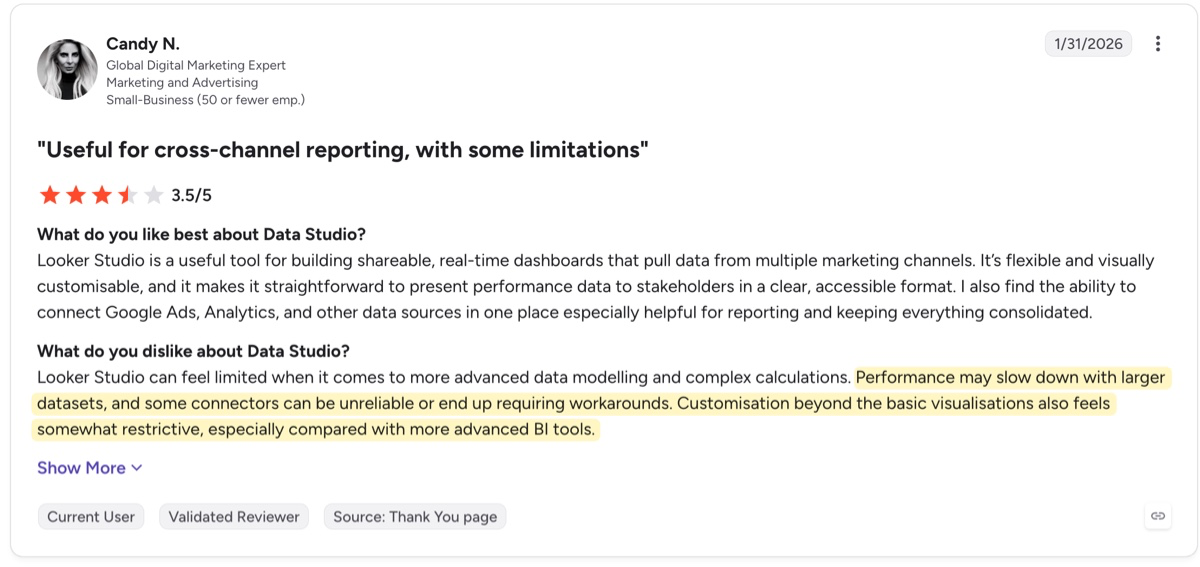
He's not the only one either. Even otherwise positive reviewers on G2 mention that Data Studio slows down or struggles to update properly. That's time you don't have when a client presentation is due in the next few hours.
Reports that don't look like your agency's work
Reports and marketing campaign presentations show clients the value of the work you've done so far. But you'll also want them to look like they came from your brand, especially when they're the only thing your clients or their stakeholders see from you.
Google Data Studio provides adequate interactive visualizations, but they fall short in providing that extra professional shine. David Wilkinson, Director of Search at Search Station, explained why the agency moved to DashThis: "We found that both were rather cumbersome and simply did not look professional or unique. They look rather dated and did not have our colours and unique theme, so we looked for an alternative."
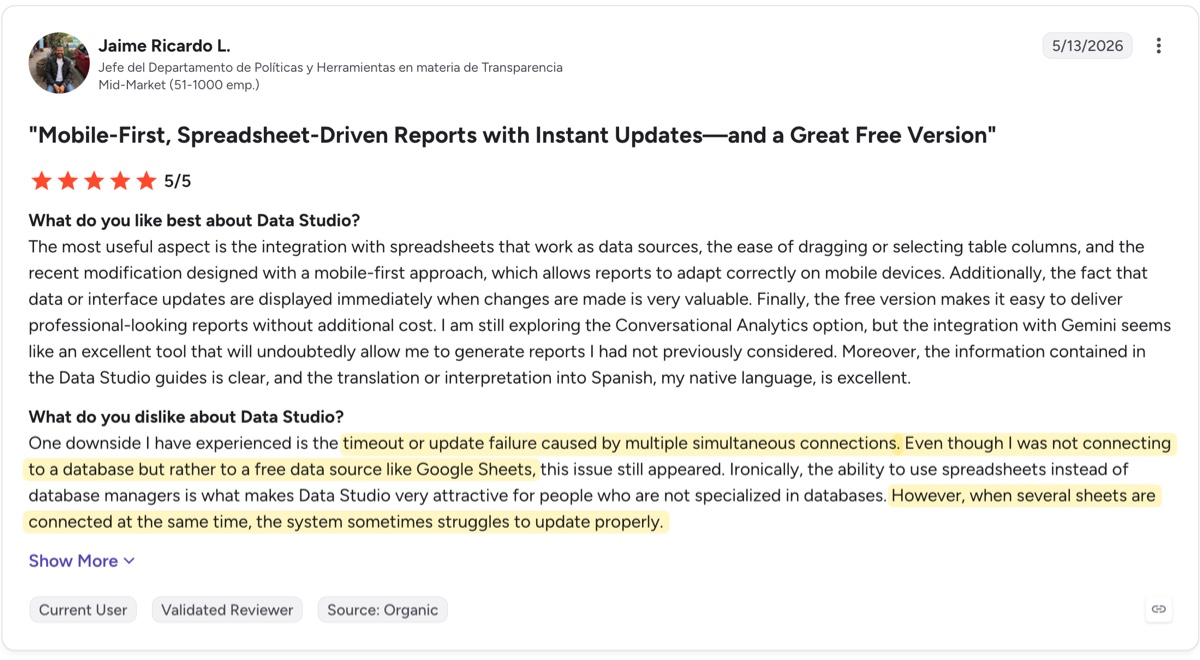
Similarly, Candy N on G2 finds customization on Data Studio restrictive.
This isn't ideal. Your reporting tool should fit how you want to tell your campaign's story, rather than forcing you to adapt the report to what the tool allows.
Data Studio alternatives at a glance and how they measure up
All calculations use the monthly plan pricing across all providers. Pricing pages accessed August 2026.
The best Data Studio alternatives for marketing reporting
DashThis: Addresses Data Studio's cost, reliability, and support gaps
DashThis is the best Data Studio alternative for marketing reporting at a transparent price point. It’s simple enough to use that your account managers can build and manage reports themselves, without waiting for anyone technical. You can get started in minutes, so you can spend less time on reporting and more time on the work that matters to your clients.
Unlike Google Data Studio, DashThis includes all 30+ integrations on every tier natively, so you won't be dependent on third-party connectors for your non-Google platform data. We also support white-labeling and custom domains from the Professional plan and up, plus AI features on all plans, unlike Data Studio, which limits AI features to its Pro plan.
We've built DashThis specifically for non-technical users, and that shapes our approach to customer support. Beyond self-service documentation, you get unlimited support from our AI assistant and human help by email.
Our customers have saved hours on marketing reporting. Marketing agency Die SEA-Experten reduced its time spent on reporting per client from two hours to minutes, whereas our customer Rani found DashThis a real time-saver when reporting.
Our customer Rani explains why her team switched from Google Data Studio to DashThis:
"The difference was immediate. DashThis's platform is so much more intuitive, our clients found the interface cleaner and easier to navigate, which completely changed how they perceived our reports. We also stopped dealing with the constant connection issues and broken data sources that plagued us in Looker Studio. It just works…"
AgencyAnalytics: Better branding and support than Data Studio, but costs grow with every new client
AgencyAnalytics uses a per-client pricing model, bundling white-labeling, its 80+ integrations, and AI features into every plan. It's a suitable alternative if you want to get away from Data Studio's hidden costs and prefer per-client pricing instead.
The trade-off is the time spent setting up your account and getting used to the platform. In our hands-on testing, we found the sheer number of options overwhelming at first. G2 reviewers have a similar experience, even in positive reviews. Patric M. rates AgencyAnalytics 5/5 and still finds some of its features hard to get his head around. Lauren N., at 4.5/5, put it more bluntly: "It is NOT user friendly and required a lot of training."
Unlike Data Studio, where customer support is a separate paid add-on, AgencyAnalytics includes responsive live chat and email support on the Core plan at no extra cost, though we found the support experience more reactive and focused on answering what you ask.
Read our hands-on review of AgencyAnalytics.
Whatagraph: Deeper data customization options than Data Studio at a premium price
Whatagraph runs on an all-in-one pricing model, $812/month for its Max plan on an annual commitment only, against Data Studio's free core product plus separate third-party connector costs.
That monthly $812 fee covers most of what a marketing agency needs: 60+ integrations, custom metrics and data aggregations, AI-powered analysis, and a dedicated Customer Success Manager. It doesn't unlock everything though. To access e-commerce, HubSpot and data warehouse connections like Google BigQuery, you'll need to upgrade to Whatagraph's Prime custom pricing.
This all-or-nothing pricing may put it out of your budget range. But if you need to blend data across platforms into single widgets, or standardize metric names for consistent cross-channel comparisons, that's what Whatagraph is for, and plans also come with a dedicated account manager Data Studio doesn't offer.
More on this in our Whatagraph review.
Swydo: Faster setup and full white-labeling than Data Studio, but watch per-source costs
Compared to Data Studio, Swydo gets you up and running fast. Just connect your data sources, pick a template, and you have a working report ready to go. It can take hours in Data Studio to set up your integrations and understand the platform before you can build anything useful.
If you found Data Studio's report templates lacking for marketing agencies, Swydo's templates are designed around marketing use cases like platform-specific reports and multi-channel reporting, complete with built-in text prompts guiding you on what to add. White-labeling is also included on every Swydo plan, a feature that Data Studio lacks.
While Swydo's per-data source billing is more straightforward to track and calculate versus Data Studio's hidden costs, you'll still need to keep an eye on your data sources to avoid extra billing, since inactive connections in Swydo still count toward your total until you remove them. If your client roster and platform mix remain stable month to month, this isn't an issue. But if you're scaling quickly or running short-term campaigns, you'll need to pay more attention to your month-on-month usage.
Read our hands-on review of Swydo.
Databox: More reliable with real BI depth, but set aside time to learn the platform
Databox's biggest strength is integration breadth. With 100+ integrations spanning marketing, sales, finance, and operations, it positions itself as a business intelligence (BI) tool built for data exploration, rather than a marketing-focused platform like DashThis or Swydo.
If your reporting needs to pull sales and finance data alongside marketing performance into one dashboard, or your clients want cross-team collaboration in a single place, Databox earns its place here. Databox's AI assistant, Genie, is included on all plans, unlike Data Studio's AI features, which are locked behind the Pro upgrade. Genie builds full reports, runs trend analysis and forecasting, flags risks automatically, and connects directly to Claude or ChatGPT through its own MCP server. Data Studio's AI features, by comparison, are limited to natural language calculated fields, importing Pro reports into Slides, and conversational analytics.
In our testing, Databox's support team looked at what we'd already connected and offered to build our first databoard for us, unprompted, a step further than simply answering the question we asked.
If you found Data Studio difficult to use or understand though, Databox's dense interface might not be the best fit. It takes time to find your footing on the platform. This isn't the fast, 15-minute setup you'll get with a tool meant for marketing reporting.
Pricing-wise, Databox bills with a flat monthly fee based on subscription tier, a variable fee dependent on how many data sources you use, and optional add-ons. Each additional source above the three data sources included with your plan adds $3/month, and features like white-labeling require a $250/month add-on, unless you're on the $999/month Premium tier.
On Capterra, Vince T. found this pricing arrangement prohibitive: "just about every basic feature, data integration, reporting or branding will cost you extra money," and switched back to Google Data Studio after less than six months. If predictable, simple billing matters more to you than BI depth, check carefully if Databox's pricing model fits your needs.
We go deeper in our Databox review.
Klipfolio: More dashboard customization than Data Studio, for people who work extensively with spreadsheets
To use Klipfolio's spreadsheet-to-dashboard tool well, you'll need to know spreadsheets and have some technical skills. This isn't a tool for non-technical marketers the way DashThis or Swydo are.
Where Klipfolio surpasses Data Studio is integration breadth and visualization depth. It connects to 130+ data sources covering databases, CRMs, and marketing platforms well beyond Data Studio's native Google ecosystem. Beyond standard bar or pie charts, you can build custom visualizations using HTML templates with your own JavaScript and CSS. Data Studio doesn't offer that same level of control, and the Pro tier doesn't add any new chart or visualization options.
Klipfolio doesn't offer AI features for now, though you can join a waitlist. Data Studio has them available today if you upgrade to the Pro plan.
Both platforms assume some technical ability. But where Data Studio's learning curve comes from its report-building interface, Klipfolio's comes from knowing spreadsheet formulas and logic. It's better suited to teams who already use spreadsheets for their reporting or have a technical team member on hand. So, if that's you, Klipfolio goes further than Data Studio.
Other worthy mentions: data pipeline tools like Porter Metrics, Supermetrics and Windsor.ai
We've left these three in one category, as they function slightly differently from dedicated reporting tools. These are data connectors that bring data from multiple platforms, handle data transformation, and feed it into a separate data visualization tool like Data Studio, rather than displaying it themselves. Unlike the other options on this list, you're still using Data Studio and adding a connector on top.
Pricing works differently here too. Since you're not replacing Data Studio directly, you'll pay for these connectors on top of whatever Data Studio itself already costs you. So when we talk about third-party connector costs in relation to Data Studio's pricing, these are the tools we're looking at.
Porter Metrics, Supermetrics, and Windsor.ai each price differently. Porter Metrics charges per data source, with the cost per source dropping as you connect more. For example, 5 sources costs $40/month on the monthly plan. Windsor.ai and Supermetrics charge by tiered pricing plans, with the former offering a limited free plan.